> ## Documentation Index
> Fetch the complete documentation index at: https://docs.bigdata.com/llms.txt
> Use this file to discover all available pages before exploring further.
# Introduction
## Overview
The **Bigdata Content API** lets you manage and query private content that you or your organization uploads to Bigdata, making it available for the Search and Research Agent after enrichment and indexing.
You can onboard content in two ways:
* **Connectors API**: For asynchronous, unsupervised, or automated workflows where content is not directly accessible by the user (e.g. email inbox, broker investment research feeds, SharePoint). You configure a connector and the service ingests the content from that source.
* **Direct upload (POST /documents)**: For clients that manage their own corpus and want to build the ingestion workflow manually. You request a pre-signed URL and document id; you upload each file via PUT to that URL, then use the id to poll for enrichment status. The workflow uploads your document, enriches it (extraction, structure and annotation of the content), and indexes it for availability in Search and Research Agent.
Both paths produce **documents** that you can list, tag, filter, and use with the Search and Research Agent Services.
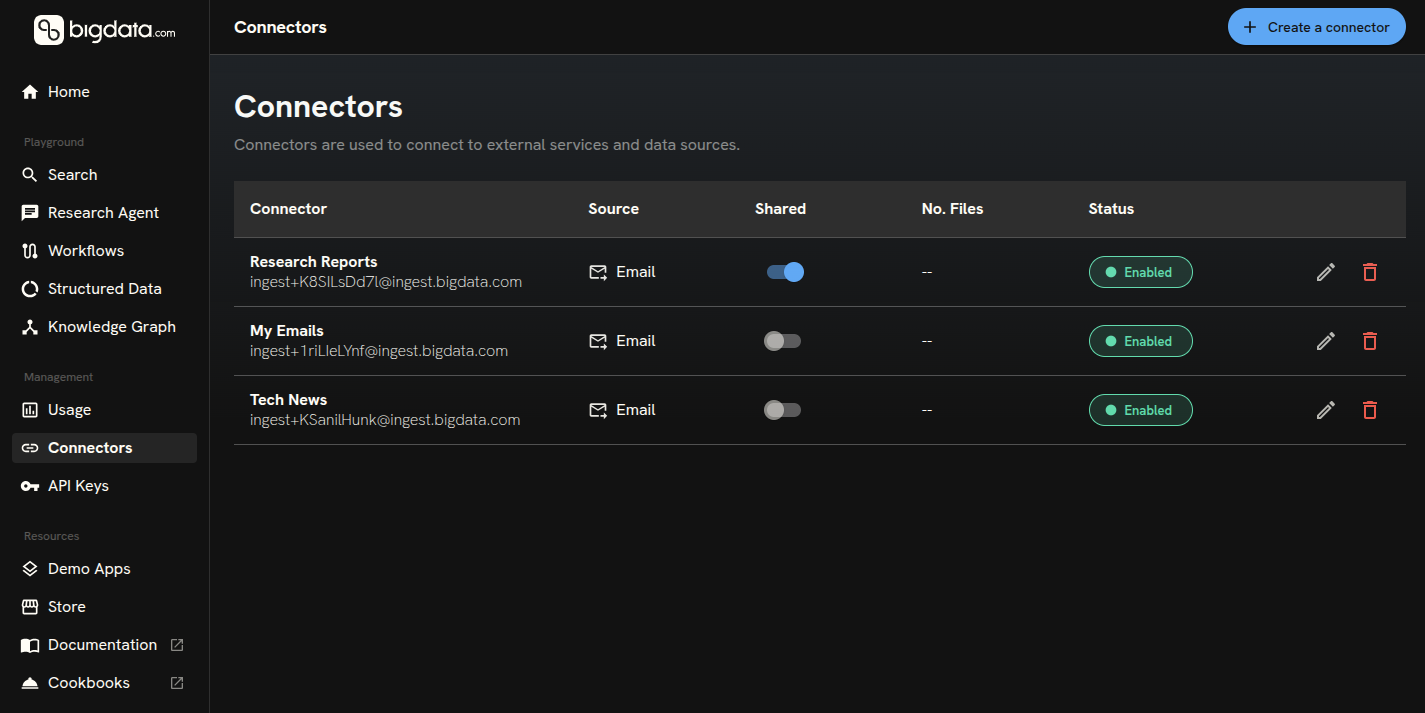
You can create and manage **Connectors** in the [Developer Platform > Connectors](https://platform.bigdata.com/connectors) (**Bigdata Connectors Management**). Use that guided flow to set up connectors in **four simple steps**.
 ***
## Connectors
**Connectors** are for ingestion that is asynchronous, unsupervised, or part of a workflow where content is not directly in the user’s hands, for example, an email inbox, a broker **investment research** feed, or a SharePoint library.
* You **create a connector** with a type, label, and type-specific configuration. Supported types include **Email Inbox**, **Investment research**, and **Microsoft SharePoint**.
* For **Email**, the API returns an inbox address; you forward messages from allowed senders to that address. Set up automatic forwarding rules in your email client to start building your corpus, Bigdata will ingest and process content automatically.
* For **Investment research**, provide broker credentials when you [create the connector](/api-reference/connectors/create-connector). Bigdata then **syncs research documents** from the broker for you. You can [retrigger a sync](/api-reference/connectors/trigger-connector-sync) with a `date_limit` when you need to refresh from a given date. Ingested documents are [tagged](/api-reference/tags/list-tags) with the broker name and **classified using Bigdata’s document taxonomy**, so you can filter and search them consistently alongside the rest of Bigdata corpus.
* For **Microsoft SharePoint**, use the same create endpoint with `"type": "sharepoint"` and **`config`** containing only **`session_id`**: a token for the session authenticated via OAuth. For how to obtain **`session_id`**, contact [support@bigdata.com](mailto:support@bigdata.com). As an alternative, follow the steps in [Bigdata Connectors Management](https://platform.bigdata.com/connectors).
* Content arriving through the connector is turned into **documents** you can manage and use via Search and Research Agent Services.
Typical operations:
* **[Create connector](/api-reference/connectors/create-connector)**: Register a new ingestion source. We recommend using [Bigdata Connectors Management](https://platform.bigdata.com/connectors) for a simple guided setup.
* **[List connectors](/api-reference/connectors/list-connectors)**: List all connectors you can access; use connector IDs to filter documents or to update, delete, or call sync.
* **[Get connector](/api-reference/connectors/get-connector-by-id)**: Fetch full details for one connector (config, share settings, timestamps).
* **[Update connector](/api-reference/connectors/update-connector-by-id)**: Change label, description, sharing, or **config** when supported.
* **[Trigger connector sync](/api-reference/connectors/trigger-connector-sync)**: Queue another synchronization for an **investment\_research** connector (POST with `date_limit` `YYYY-MM-DD` to resync from that date onward) or a **sharepoint** connector (POST with an empty body `{}`).
* **[Delete connector](/api-reference/connectors/delete-connector-by-id)**: Soft-delete (archive) a connector by default—it stops ingesting new content but existing documents remain. Use `?force_delete=true` to trigger a hard delete: all files related to the connector are deleted asynchronously, then the connector is removed from the database.
Once a connector is set up, documents are ingested according to its configuration.
***
## Documents
**Documents** are the items Bigdata has uploaded, enriched, and indexed for search and analysis, whether they came from a connector (e.g. email, SharePoint) or from **direct upload**.
**Direct upload** is intended for clients that manage their corpus and want to build the ingestion workflow from scratch: you choose what to send, when, and with what metadata (file name, tags, sharing). The main focus is **enrichment**: once you upload the file (PUT to the pre-signed URL), Bigdata enriches it (extraction, structure and annotation of the content), then indexes it for availability in Search and Research Agent. Use **[Enrich document](/api-reference/documents/enrich-document)** to get a pre-signed URL and document id; PUT the file to that URL, then use the id with [Get document metadata](/api-reference/documents/get-document-metadata) to poll for status until enrichment and indexing are complete.
The following operations apply to all documents, whether they were ingested via a connector or direct upload:
* **[List documents](/api-reference/documents/list-documents)**: Paginated list of documents you can access. Supports filtering and sorting (including `origin` values `email`, `investment_research`, `sharepoint`, and `file_upload`); each item includes a content ID for use with the other document endpoints.
* **[Get document metadata](/api-reference/documents/get-document-metadata)**: Return metadata for one document by content ID (status, file name, connector, tags, timestamps). Use this to check enrichment status before downloading content.
* **[Update document metadata](/api-reference/documents/update-document-metadata)**: Change which tags are assigned to a document and whether the document is shared with your organization.
* **[Get annotated document](/api-reference/documents/get-annotated-document)**: Return a time-limited pre-signed URL. GET that URL to download **private** document content as structured JSON (metadata, title, body blocks, entities, sentences with sentiment). Use for search indexing, entity extraction, or structured display.
* **[Get original document](/api-reference/documents/get-original-document)**: Return a time-limited pre-signed URL. GET that URL to download the **private** document’s original file in its native format (e.g. .eml, .pdf).
* **[Delete document](/api-reference/documents/delete-document)**: Remove a document from the platform. Deletes the original document, annotated version, and chunks from the vector database.
Documents can be **tagged** automatically from ingestion, for example **sender/recipient-metadata** tags for email, and **`broker:Broker Name`** for investment research. You can also define **custom tags** and attach them to documents after upload.
***
## Tags
Tags help you organize and filter documents in **Search Service** and **Research Agent**.
* **[List tags](/api-reference/tags/list-tags)**: List tags visible to your organization (including connector-generated tags), with document counts. Use optional `prefix` to narrow results (for example `broker:`, `from:`, or `to:`).
* **[Create tag](/api-reference/tags/create-tag)**: Create a custom tag by name. The response includes an `id` you use when updating document metadata.
To change tags on an existing document, call **[Update document metadata](/api-reference/documents/update-document-metadata)** with a `tags` array of **tag IDs** (not names). The array replaces the document's current tags, so you can extend or reduce the set by sending the full list you want. Every ID must exist; otherwise the API returns `400` with `INVALID_TAGS_ERROR`. You can combine tag updates with `share_with_org` in the same request to change organization-wide visibility.
***
## Typical flow
**Using connectors (async / unsupervised):**
1. **[Create a connector](/api-reference/connectors/create-connector)** (e.g. email) with type, label, and config; for email, use the returned inbox address to forward messages.
2. Optionally check that content has been enriched and indexed by [listing your recent documents](/api-reference/documents/list-documents).
3. Use your content in the Search or Research Agent Service (e.g. filter by **Emails** in the playgrounds below).
**Using direct upload (manual corpus):**
1. Call **[Enrich document](/api-reference/documents/enrich-document)** with metadata (file name, tags, sharing); use the returned URL to PUT the file (upload it).
2. Poll [Get document metadata](/api-reference/documents/get-document-metadata) with the returned id to check `status` until enrichment and indexing are complete (`completed`). See [Get document metadata](/api-reference/documents/get-document-metadata) in the API reference.
3. Use your content in the Search or Research Agent Service (e.g. filter by **My Files** in the playgrounds below).
Search across your private content and other sources. In the playground, open the source selector and choose **My Files** to limit results to your uploaded documents.
Run research over your private content and real-time data. In the playground, use the source selector and filter by **My Files** to ground answers in your documents.
***
## Authentication and reference
All endpoints require an API key sent in the `X-API-KEY` header. See [Authentication](/api-rest/introduction) for details.
Use the **API reference** (endpoints listed in this section) for request/response schemas, parameters, and examples. You can try the API from the [Developer Platform](https://platform.bigdata.com) playgrounds.
***
## Connectors
**Connectors** are for ingestion that is asynchronous, unsupervised, or part of a workflow where content is not directly in the user’s hands, for example, an email inbox, a broker **investment research** feed, or a SharePoint library.
* You **create a connector** with a type, label, and type-specific configuration. Supported types include **Email Inbox**, **Investment research**, and **Microsoft SharePoint**.
* For **Email**, the API returns an inbox address; you forward messages from allowed senders to that address. Set up automatic forwarding rules in your email client to start building your corpus, Bigdata will ingest and process content automatically.
* For **Investment research**, provide broker credentials when you [create the connector](/api-reference/connectors/create-connector). Bigdata then **syncs research documents** from the broker for you. You can [retrigger a sync](/api-reference/connectors/trigger-connector-sync) with a `date_limit` when you need to refresh from a given date. Ingested documents are [tagged](/api-reference/tags/list-tags) with the broker name and **classified using Bigdata’s document taxonomy**, so you can filter and search them consistently alongside the rest of Bigdata corpus.
* For **Microsoft SharePoint**, use the same create endpoint with `"type": "sharepoint"` and **`config`** containing only **`session_id`**: a token for the session authenticated via OAuth. For how to obtain **`session_id`**, contact [support@bigdata.com](mailto:support@bigdata.com). As an alternative, follow the steps in [Bigdata Connectors Management](https://platform.bigdata.com/connectors).
* Content arriving through the connector is turned into **documents** you can manage and use via Search and Research Agent Services.
Typical operations:
* **[Create connector](/api-reference/connectors/create-connector)**: Register a new ingestion source. We recommend using [Bigdata Connectors Management](https://platform.bigdata.com/connectors) for a simple guided setup.
* **[List connectors](/api-reference/connectors/list-connectors)**: List all connectors you can access; use connector IDs to filter documents or to update, delete, or call sync.
* **[Get connector](/api-reference/connectors/get-connector-by-id)**: Fetch full details for one connector (config, share settings, timestamps).
* **[Update connector](/api-reference/connectors/update-connector-by-id)**: Change label, description, sharing, or **config** when supported.
* **[Trigger connector sync](/api-reference/connectors/trigger-connector-sync)**: Queue another synchronization for an **investment\_research** connector (POST with `date_limit` `YYYY-MM-DD` to resync from that date onward) or a **sharepoint** connector (POST with an empty body `{}`).
* **[Delete connector](/api-reference/connectors/delete-connector-by-id)**: Soft-delete (archive) a connector by default—it stops ingesting new content but existing documents remain. Use `?force_delete=true` to trigger a hard delete: all files related to the connector are deleted asynchronously, then the connector is removed from the database.
Once a connector is set up, documents are ingested according to its configuration.
***
## Documents
**Documents** are the items Bigdata has uploaded, enriched, and indexed for search and analysis, whether they came from a connector (e.g. email, SharePoint) or from **direct upload**.
**Direct upload** is intended for clients that manage their corpus and want to build the ingestion workflow from scratch: you choose what to send, when, and with what metadata (file name, tags, sharing). The main focus is **enrichment**: once you upload the file (PUT to the pre-signed URL), Bigdata enriches it (extraction, structure and annotation of the content), then indexes it for availability in Search and Research Agent. Use **[Enrich document](/api-reference/documents/enrich-document)** to get a pre-signed URL and document id; PUT the file to that URL, then use the id with [Get document metadata](/api-reference/documents/get-document-metadata) to poll for status until enrichment and indexing are complete.
The following operations apply to all documents, whether they were ingested via a connector or direct upload:
* **[List documents](/api-reference/documents/list-documents)**: Paginated list of documents you can access. Supports filtering and sorting (including `origin` values `email`, `investment_research`, `sharepoint`, and `file_upload`); each item includes a content ID for use with the other document endpoints.
* **[Get document metadata](/api-reference/documents/get-document-metadata)**: Return metadata for one document by content ID (status, file name, connector, tags, timestamps). Use this to check enrichment status before downloading content.
* **[Update document metadata](/api-reference/documents/update-document-metadata)**: Change which tags are assigned to a document and whether the document is shared with your organization.
* **[Get annotated document](/api-reference/documents/get-annotated-document)**: Return a time-limited pre-signed URL. GET that URL to download **private** document content as structured JSON (metadata, title, body blocks, entities, sentences with sentiment). Use for search indexing, entity extraction, or structured display.
* **[Get original document](/api-reference/documents/get-original-document)**: Return a time-limited pre-signed URL. GET that URL to download the **private** document’s original file in its native format (e.g. .eml, .pdf).
* **[Delete document](/api-reference/documents/delete-document)**: Remove a document from the platform. Deletes the original document, annotated version, and chunks from the vector database.
Documents can be **tagged** automatically from ingestion, for example **sender/recipient-metadata** tags for email, and **`broker:Broker Name`** for investment research. You can also define **custom tags** and attach them to documents after upload.
***
## Tags
Tags help you organize and filter documents in **Search Service** and **Research Agent**.
* **[List tags](/api-reference/tags/list-tags)**: List tags visible to your organization (including connector-generated tags), with document counts. Use optional `prefix` to narrow results (for example `broker:`, `from:`, or `to:`).
* **[Create tag](/api-reference/tags/create-tag)**: Create a custom tag by name. The response includes an `id` you use when updating document metadata.
To change tags on an existing document, call **[Update document metadata](/api-reference/documents/update-document-metadata)** with a `tags` array of **tag IDs** (not names). The array replaces the document's current tags, so you can extend or reduce the set by sending the full list you want. Every ID must exist; otherwise the API returns `400` with `INVALID_TAGS_ERROR`. You can combine tag updates with `share_with_org` in the same request to change organization-wide visibility.
***
## Typical flow
**Using connectors (async / unsupervised):**
1. **[Create a connector](/api-reference/connectors/create-connector)** (e.g. email) with type, label, and config; for email, use the returned inbox address to forward messages.
2. Optionally check that content has been enriched and indexed by [listing your recent documents](/api-reference/documents/list-documents).
3. Use your content in the Search or Research Agent Service (e.g. filter by **Emails** in the playgrounds below).
**Using direct upload (manual corpus):**
1. Call **[Enrich document](/api-reference/documents/enrich-document)** with metadata (file name, tags, sharing); use the returned URL to PUT the file (upload it).
2. Poll [Get document metadata](/api-reference/documents/get-document-metadata) with the returned id to check `status` until enrichment and indexing are complete (`completed`). See [Get document metadata](/api-reference/documents/get-document-metadata) in the API reference.
3. Use your content in the Search or Research Agent Service (e.g. filter by **My Files** in the playgrounds below).
Search across your private content and other sources. In the playground, open the source selector and choose **My Files** to limit results to your uploaded documents.
Run research over your private content and real-time data. In the playground, use the source selector and filter by **My Files** to ground answers in your documents.
***
## Authentication and reference
All endpoints require an API key sent in the `X-API-KEY` header. See [Authentication](/api-rest/introduction) for details.
Use the **API reference** (endpoints listed in this section) for request/response schemas, parameters, and examples. You can try the API from the [Developer Platform](https://platform.bigdata.com) playgrounds.