
Víctor Pimentel Naranjo
Senior Product Manager, Team Lead
April 21, 2026
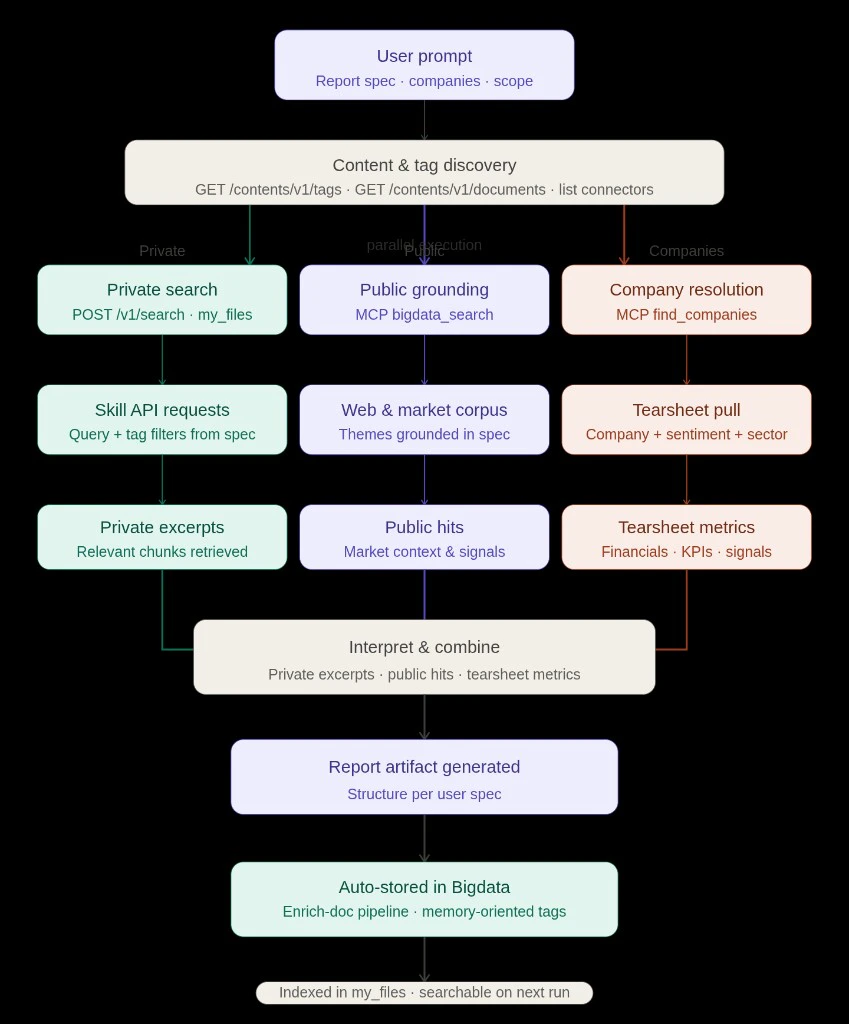 *Diagram: full lifecycle with parallel execution after content & tag discovery; synthesis feeds enrich and index the resulting report in Bigdata.*
### The prompt
The run was driven by this exact user prompt:
```
Analyze the emails received from dan@tldrnewsletter.com. Identify key players and generate a report comparing the most relevant events of each organization.
Enrich this report with quantitative data you can extract from company and sentiment tearsheet via Bigdata MCP.
The report concludes with a series of forward-looking indicators and a list of relevant events to keep in mind.
```
That instruction fixes the **private slice** (newsletter / sender scope), the deliverable format and the **market enrichment** (company + sentiment tearsheets over [Bigdata.com](https://bigdata.com) MCP).
### Discovery: inventory before retrieval
Before any heavy retrieval, the agent can use the **private content APIs** to explore what is actually indexed: **GET** `/contents/v1/tags`, **GET** `/contents/v1/documents`, and connector listings when needed. Those calls support the same questions a careful analyst would ask up front: *What can I filter on?*, *What content do I have access to?*, *Roughly what volume sits behind each tag or connector?* So the next step is grounded in real names and counts instead of guesswork. Once that inventory is clear, later search filters such as **`query.filters.tag.any_of`** can use **real tag names** from the platform, which keeps the newsletter or sender scope in the prompt aligned with identifiers that actually exist in the index.
### Private lane (teal): skill-shaped API calls
Private grounding runs through the **Search API** with category **my\_files**: Claude issues **`POST /v1/search`** with `query.text` shaped from the report spec, and narrows results with **`query.filters.tag.any_of`** when tags are known, including **sender-level tags** produced by **automatic EML metadata tagging** on ingest, so provenance becomes a filter instead of a brittle full-text workaround. For this newsletter exercise, that meant tags such as `from:dan@tldrnewsletter.com` to stay on the TLDR slice, **multiple thematic searches** under that constraint to maximize recall and then **ranking recurring organizations** from the retrieved set (OpenAI, Anthropic, Alphabet, Apple, Meta, Nvidia, fintech names, and others).
### Public lane (purple): MCP `bigdata_search`
The same themes that drive private `query.text` are mirrored into **`bigdata_search`** so the narrative is anchored in **web and market corpus** context: quotes, catalysts, and sector chatter that do not exist in your private content. Those public pulls ran **in parallel** with the private searches so the write-up could contrast newsletter emphasis with what the wider market corpus was highlighting.
### Companies lane (coral): resolve, then tearsheet
For each named issuer, **`find_companies`** returns the RavenPack entity id and public/private type. That unlocks **`bigdata_company_tearsheet`** and **`bigdata_sentiment_tearsheet`** (public names) so tables can carry **EPS surprises, multiples, consensus, KPIs**, and **media sentiment scores**. After the organization shortlist was stable, Claude **pulled tearsheets** for key public filers and a **private-company** profile where data was available, so the tables were filled from tools, not hand-typed placeholders.
### Deliverable: Report, workflow notes, and the repeatable contract
With retrieval and enrichment in place, Claude wrote the prompted report. See the generated artifact below:
When the report reads well and you want it to **live as first-class memory**, ask Claude to **publish or enrich** the report through the usual content path (for example **enrich-document** in your skill). The platform then **processes and indexes** the artifact so the next research session can **search it alongside newsletters and tearsheets** instead of losing it as a one-off export. You can also enrich it with custom tags and configurations that fit your research workflow.
The important product is not any single file format, it is the **repeatable contract**: discovery, parallel lanes, merge, **enrich** and **indexed memory**.
***
## Why automatic EML tagging matters
Email connectors are noisy. **Automatic EML metadata tagging** turns “who sent this?” into a **first-class filter** in the Search API. The user’s hint "ground only mail from this sender" becomes a **tag constraint**, not a fragile regex over bodies. That is how a **newsletter connector** stays usable at scale: each issue inherits predictable and discoverable tags.
***
## Skills as the glue in Claude
We ran this in **Claude** with the Bigdata MCP connector enabled and a **packaged skill** that encodes the playbook, similar idea as the ecosystem’s [Financial Research Analyst skill](/skills-reference/mcp-helpers/financial-research-analyst). The pattern is always **structured routing + tool contracts + provenance in the answer**.
Our skill encodes:
* **Inventory-first** when tags or connectors are unknown.
* **`find_companies` before tearsheets** to avoid wrong-entity financials.
* **Enrich upload** when the user wants the artifact to join **`my_files`** with explicit tags for the next “memory workload.”
***
## What comes next
This is only the beginning. We are actively expanding the library of skills and workflows available through Bigdata MCP. If your team has a research workflow that could benefit from this approach, email us at [support@bigdata.com](mailto:support@bigdata.com). We would love to hear what you are building or what we can build together.
***
## Relevant links
* [Professional-Grade Financial Reports with Claude, Bigdata MCP, and Skills](/blog/mcp/claude_with_bigdata): Claude, MCP, and skills stack for institutional-style outputs.
* [Financial Research Analyst skill](/skills-reference/mcp-helpers/financial-research-analyst): packaged playbook for research and writing with Bigdata tools.
* [Claude MCP integration](/mcp-reference/oauth-integrations/claude-mcp-integration): enabling the Bigdata connector in Claude.
* [Content API introduction](/api-rest/content_introduction): connectors, uploads, and private document operations.
* [Upload your own content](/getting-started/upload_your_own_content): tags, listing documents, and using tags in search.
* [List tags](/api-reference/tags/list-tags): **GET** `/contents/v1/tags`.
* [List documents](/api-reference/documents/list-documents): **GET** `/contents/v1/documents`.
* [Search documents](/api-reference/search/search-documents): **POST** `/v1/search`, including `my_files` and `query.filters.tag`.
* [Search in uploaded files](/how-to-guides/search_in_uploaded_files): end-to-end upload and search over private content.
***
*Diagram: full lifecycle with parallel execution after content & tag discovery; synthesis feeds enrich and index the resulting report in Bigdata.*
### The prompt
The run was driven by this exact user prompt:
```
Analyze the emails received from dan@tldrnewsletter.com. Identify key players and generate a report comparing the most relevant events of each organization.
Enrich this report with quantitative data you can extract from company and sentiment tearsheet via Bigdata MCP.
The report concludes with a series of forward-looking indicators and a list of relevant events to keep in mind.
```
That instruction fixes the **private slice** (newsletter / sender scope), the deliverable format and the **market enrichment** (company + sentiment tearsheets over [Bigdata.com](https://bigdata.com) MCP).
### Discovery: inventory before retrieval
Before any heavy retrieval, the agent can use the **private content APIs** to explore what is actually indexed: **GET** `/contents/v1/tags`, **GET** `/contents/v1/documents`, and connector listings when needed. Those calls support the same questions a careful analyst would ask up front: *What can I filter on?*, *What content do I have access to?*, *Roughly what volume sits behind each tag or connector?* So the next step is grounded in real names and counts instead of guesswork. Once that inventory is clear, later search filters such as **`query.filters.tag.any_of`** can use **real tag names** from the platform, which keeps the newsletter or sender scope in the prompt aligned with identifiers that actually exist in the index.
### Private lane (teal): skill-shaped API calls
Private grounding runs through the **Search API** with category **my\_files**: Claude issues **`POST /v1/search`** with `query.text` shaped from the report spec, and narrows results with **`query.filters.tag.any_of`** when tags are known, including **sender-level tags** produced by **automatic EML metadata tagging** on ingest, so provenance becomes a filter instead of a brittle full-text workaround. For this newsletter exercise, that meant tags such as `from:dan@tldrnewsletter.com` to stay on the TLDR slice, **multiple thematic searches** under that constraint to maximize recall and then **ranking recurring organizations** from the retrieved set (OpenAI, Anthropic, Alphabet, Apple, Meta, Nvidia, fintech names, and others).
### Public lane (purple): MCP `bigdata_search`
The same themes that drive private `query.text` are mirrored into **`bigdata_search`** so the narrative is anchored in **web and market corpus** context: quotes, catalysts, and sector chatter that do not exist in your private content. Those public pulls ran **in parallel** with the private searches so the write-up could contrast newsletter emphasis with what the wider market corpus was highlighting.
### Companies lane (coral): resolve, then tearsheet
For each named issuer, **`find_companies`** returns the RavenPack entity id and public/private type. That unlocks **`bigdata_company_tearsheet`** and **`bigdata_sentiment_tearsheet`** (public names) so tables can carry **EPS surprises, multiples, consensus, KPIs**, and **media sentiment scores**. After the organization shortlist was stable, Claude **pulled tearsheets** for key public filers and a **private-company** profile where data was available, so the tables were filled from tools, not hand-typed placeholders.
### Deliverable: Report, workflow notes, and the repeatable contract
With retrieval and enrichment in place, Claude wrote the prompted report. See the generated artifact below:
When the report reads well and you want it to **live as first-class memory**, ask Claude to **publish or enrich** the report through the usual content path (for example **enrich-document** in your skill). The platform then **processes and indexes** the artifact so the next research session can **search it alongside newsletters and tearsheets** instead of losing it as a one-off export. You can also enrich it with custom tags and configurations that fit your research workflow.
The important product is not any single file format, it is the **repeatable contract**: discovery, parallel lanes, merge, **enrich** and **indexed memory**.
***
## Why automatic EML tagging matters
Email connectors are noisy. **Automatic EML metadata tagging** turns “who sent this?” into a **first-class filter** in the Search API. The user’s hint "ground only mail from this sender" becomes a **tag constraint**, not a fragile regex over bodies. That is how a **newsletter connector** stays usable at scale: each issue inherits predictable and discoverable tags.
***
## Skills as the glue in Claude
We ran this in **Claude** with the Bigdata MCP connector enabled and a **packaged skill** that encodes the playbook, similar idea as the ecosystem’s [Financial Research Analyst skill](/skills-reference/mcp-helpers/financial-research-analyst). The pattern is always **structured routing + tool contracts + provenance in the answer**.
Our skill encodes:
* **Inventory-first** when tags or connectors are unknown.
* **`find_companies` before tearsheets** to avoid wrong-entity financials.
* **Enrich upload** when the user wants the artifact to join **`my_files`** with explicit tags for the next “memory workload.”
***
## What comes next
This is only the beginning. We are actively expanding the library of skills and workflows available through Bigdata MCP. If your team has a research workflow that could benefit from this approach, email us at [support@bigdata.com](mailto:support@bigdata.com). We would love to hear what you are building or what we can build together.
***
## Relevant links
* [Professional-Grade Financial Reports with Claude, Bigdata MCP, and Skills](/blog/mcp/claude_with_bigdata): Claude, MCP, and skills stack for institutional-style outputs.
* [Financial Research Analyst skill](/skills-reference/mcp-helpers/financial-research-analyst): packaged playbook for research and writing with Bigdata tools.
* [Claude MCP integration](/mcp-reference/oauth-integrations/claude-mcp-integration): enabling the Bigdata connector in Claude.
* [Content API introduction](/api-rest/content_introduction): connectors, uploads, and private document operations.
* [Upload your own content](/getting-started/upload_your_own_content): tags, listing documents, and using tags in search.
* [List tags](/api-reference/tags/list-tags): **GET** `/contents/v1/tags`.
* [List documents](/api-reference/documents/list-documents): **GET** `/contents/v1/documents`.
* [Search documents](/api-reference/search/search-documents): **POST** `/v1/search`, including `my_files` and `query.filters.tag`.
* [Search in uploaded files](/how-to-guides/search_in_uploaded_files): end-to-end upload and search over private content.
***
Víctor Pimentel Naranjo
Senior Product Manager, Team Lead