> ## Documentation Index
> Fetch the complete documentation index at: https://docs.bigdata.com/llms.txt
> Use this file to discover all available pages before exploring further.

# Replit MCP Integration

## Overview

[Replit](https://replit.com) can connect to the Bigdata.com Remote MCP as a **custom connector**. This guide walks you through adding the connector with a one-click setup link, then authenticating it with your Bigdata.com API key so you can search financial news, resolve securities, and generate research from Replit.

<Note>
  Bigdata.com is not yet listed as an official Replit connector. Use the custom connector link below to add it to your Replit integrations.
</Note>

## Requirements

* A [Replit](https://replit.com) account
* A Bigdata.com API key from the [Developer Platform](https://platform.bigdata.com/api-keys)

## Configuration Steps

<Steps>
  <Step title="Create a Bigdata API key">
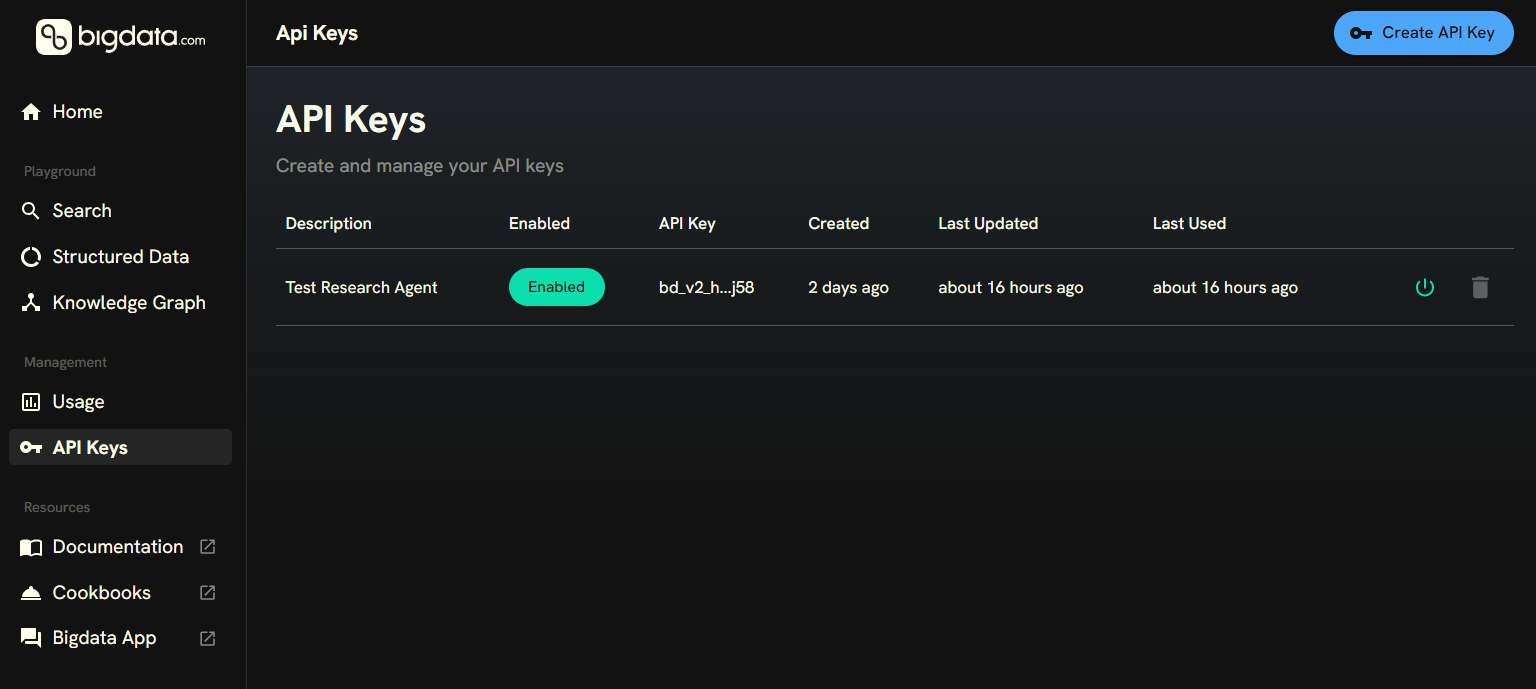
    Create an API key in [Developer Platform > API Keys](https://platform.bigdata.com/api-keys). You will paste this key into the Replit connector in the next step.

    <img src="https://mintcdn.com/ravenpackinternational/f62VnqoeoLD7OgQl/images/authentication/api_key_settings.png?fit=max&auto=format&n=f62VnqoeoLD7OgQl&q=85&s=cf16d5701fa628a8ec548137caa2fa18" alt="Developer Platform > API Keys" data-og-width="1536" width="1536" data-og-height="689" height="689" data-path="images/authentication/api_key_settings.png" data-optimize="true" data-opv="3" srcset="https://mintcdn.com/ravenpackinternational/f62VnqoeoLD7OgQl/images/authentication/api_key_settings.png?w=280&fit=max&auto=format&n=f62VnqoeoLD7OgQl&q=85&s=8cc7a63e03af48aaa3cb5d1f4d697128 280w, https://mintcdn.com/ravenpackinternational/f62VnqoeoLD7OgQl/images/authentication/api_key_settings.png?w=560&fit=max&auto=format&n=f62VnqoeoLD7OgQl&q=85&s=1c74493718b528caf178749e536dc404 560w, https://mintcdn.com/ravenpackinternational/f62VnqoeoLD7OgQl/images/authentication/api_key_settings.png?w=840&fit=max&auto=format&n=f62VnqoeoLD7OgQl&q=85&s=53a485901a8d4ea94b9d1c689d9255c4 840w, https://mintcdn.com/ravenpackinternational/f62VnqoeoLD7OgQl/images/authentication/api_key_settings.png?w=1100&fit=max&auto=format&n=f62VnqoeoLD7OgQl&q=85&s=62c0768c1fbdcf18d17f9331b381ad4c 1100w, https://mintcdn.com/ravenpackinternational/f62VnqoeoLD7OgQl/images/authentication/api_key_settings.png?w=1650&fit=max&auto=format&n=f62VnqoeoLD7OgQl&q=85&s=ef7be32d0790f9e1a1a9b2f03a8fe709 1650w, https://mintcdn.com/ravenpackinternational/f62VnqoeoLD7OgQl/images/authentication/api_key_settings.png?w=2500&fit=max&auto=format&n=f62VnqoeoLD7OgQl&q=85&s=1311b4ec9fe05b5d341614768ceed10f 2500w" />

    <Tip>
      Store the API key in your password manager so you can reuse it later.
    </Tip>
  </Step>

  <Step title="Add the Bigdata.com custom connector">
    Open the Replit integrations page with the Bigdata.com custom connector pre-filled:

    <p align="center">
      <a href="https://replit.com/integrations?mcp=eyJkaXNwbGF5TmFtZSI6IkJpZ2RhdGEuY29tIiwiYmFzZVVybCI6Imh0dHBzOi8vbWNwLmJpZ2RhdGEuY29tIiwiaGVhZGVycyI6W3sia2V5IjoiWC1BUEktS0VZIiwidmFsdWUiOiJZT1VSX0FQSV9LRVkifV19" target="_blank" rel="noopener noreferrer">
        <img alt="Add Bigdata.com to Replit" noZoom src="https://img.shields.io/badge/Add_Bigdata.com_to-Replit-F26207?style=for-the-badge&logo=replit&logoColor=white" />
      </a>
    </p>

    The link configures:

    * **Display name**: `Bigdata.com`
    * **Server URL**: `https://mcp.bigdata.com`
    * **Header**: `X-API-KEY`
  </Step>

  <Step title="Replace the API key placeholder">
    In the Replit connector setup, expand **Advanced settings** and replace `YOUR_API_KEY` with the API key you created in the previous step, then save the connector.

    <img src="https://mintcdn.com/ravenpackinternational/ZngAYYSkvUYTpz2c/images/mcp/replit-custom-connector-apikey-setting.png?fit=max&auto=format&n=ZngAYYSkvUYTpz2c&q=85&s=6e9b103f11f3a6dc4e5acafdd36f8dc1" alt="Bigdata.com setup in Replit" width="1386" height="1378" data-path="images/mcp/replit-custom-connector-apikey-setting.png" />
  </Step>
</Steps>

🥳🚀 **Done!** The Bigdata.com custom connector is ready to use in Replit.


This documentation is built and hosted on [Mintlify](https://mintlify.com), a developer documentation platform.