> ## Documentation Index
> Fetch the complete documentation index at: https://docs.bigdata.com/llms.txt
> Use this file to discover all available pages before exploring further.
# Grok MCP Integration
This guide will walk you through setting up the official Bigdata.com Connector in Grok, so you can use it in Grok Web and App.
🚀 Ready to bring the financial expertise of Bigdata.com to your Grok environment using our **Bigdata.com Official Connector**?
## Configuration Steps
Find the **Bigdata.com** connector in Grok.
1. Open [Grok](https://grok.com/)
2. Ask Grok to connect it for you:
```
I want to connect to the Bigdata plugin
```
Or do it manually: click **Plugins** at the bottom of the left-hand sidebar and search for "Bigdata"
3. Click the Bigdata.com connector and click **Connect**
 🥳🚀 **Done!** You should see the **Bigdata.com Official Connector** added and ready to be used in your conversations
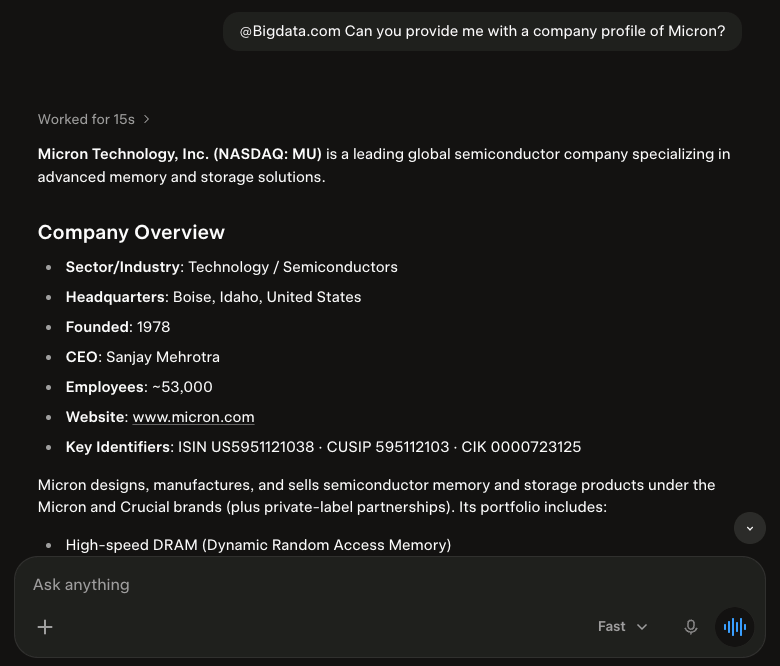
 Question:
```
@Bigdata.com Can you provide me with a company profile of Micron?
```
Answer:
Question:
```
@Bigdata.com Can you provide me with a company profile of Micron?
```
Answer:
 This documentation is built and hosted on [Mintlify](https://mintlify.com), a developer documentation platform.