> ## Documentation Index
> Fetch the complete documentation index at: https://docs.bigdata.com/llms.txt
> Use this file to discover all available pages before exploring further.
# bigdata_search
> Search engine for financial documents, earnings call transcripts, news articles, analyst reports, SEC filings, private uploads, and business content.
## Overview
The `bigdata_search` tool is a search engine for financial documents, earnings call transcripts, news articles, analyst reports, your private uploaded files, SEC filings, and business content from thousands of companies and sources. It returns document chunks with full context, timestamps, and source attribution (URL). Ideal for research, analysis, fact-finding, and gathering company-specific information.
For the best experience, install the Bigdata plugin that includes the Financial Research Analyst skill:
* [Bigdata plugin in Claude](/mcp-reference/plugins/bigdata-com)
* [Bigdata plugin in VS Code](/mcp-reference/plugins/vs-code-bigdata-plugin)
## Request object
| Parameter | Type | Required | Description |
| :-------- | :----- | :------- | :------------------------------------------------------------------------------------------------------------------------------ |
| `request` | object | Yes | Search request object containing `search_mode` (`"fast"` or `"smart"`) and a `query` object with `text` and optional `filters`. |
It supports different `query` parameters depending on `search_mode`. For more detail on how **fast** and **smart** modes differ, see [Fast vs smart search](/getting-started/bigdata_api_pricing#what-is-the-difference-between-fast-and-smart-search-modes).
**request:** You can copy and paste it in the MCP Inspector to test it out.
```json title="Search request example (fast mode)" theme={null}
{
"search_mode": "fast",
"query": {
"text": "Netflix's partnership",
"filters": {
"document_type": {
"mode": "INCLUDE",
"values": [
{
"type": "NEWS"
}
]
}
}
}
}
```
| Field | Type | Required | Description |
| :----------------- | :----- | :------- | :----------------------------------------------------------------------------------------------------------------------------------------------- |
| `search_mode` | string | Yes | `"fast"` performs a direct semantic and lexical search. `"smart"` uses an AI agent to interpret the query and perform a more intelligent search. |
| `query.text` | string | Yes | Natural-language search query. |
| `filters` | object | No | Filter object to narrow results (see below). |
| `query.max_chunks` | int | No | Maximum number of chunks to retrieve. |
#### Filters
All filters are optional and go inside `request.query.filters`.
| **Filter**
| Type | Description |
| :------------------------------------------------ | :------------------------------------------------ | :--------------------------------------------------------------------------------------------- |
| `reporting_entities` | list\[string] | Entity IDs of the company that authored or filed the document. |
| `entity` | object (`any_of` / `all_of` / `none_of`) | Entity IDs of companies **mentioned** in the document, regardless of who published it. |
| `document_type` | object (`mode`: INCLUDE/EXCLUDE, `values`: list) | Filter by document type. |
| `timestamp` | object (`start` / `end` in ISO 8601) | Filter by publication date range. |
| `category` | object (`mode`: INCLUDE/EXCLUDE, `values`: list) | Filter by source category: `"transcripts"`, `"filings"`, `"news"`, `"research"`, `"my_files"`. |
| `keyword` | object (`any_of` / `all_of` / `none_of`) | Filter by keywords found in documents. |
| `reporting_periods` | list of objects (`fiscal_year`, `fiscal_quarter`) | Filter by fiscal reporting period. |
**request:** You can copy and paste it in the MCP Inspector to test it out.
```json title="Search request example (smart mode)" theme={null}
{
"search_mode": "smart",
"query": {
"text": "Netflix's partnership in news"
}
}
```
Smart mode uses an AI agent to interpret the query. The `query` object only needs `text` which describes what to find in natural language (you can mention sources, categories, document types or other filters as part of the query text).
| Field | Type | Required | Description |
| :----------------- | :----- | :------- | :----------------------------------------------------------------------------------------------------------------------------------------------- |
| `search_mode` | string | Yes | `"fast"` performs a direct semantic and lexical search. `"smart"` uses an AI agent to interpret the query and perform a more intelligent search. |
| `query.text` | string | Yes | Natural-language search query. |
| `query.max_chunks` | int | No | Maximum number of chunks to retrieve. |
## Response object
The response contains a `results` array, where each element represents a matching document with the following fields:
| Field | Type | Description |
| :---------- | :-------------- | :------------------------------------------------------------------------------------------------------------------------------------------------------------------------------------------------------- |
| `id` | string | The unique identifier of the document, a 32-character hexadecimal string. |
| `headline` | string | The title of the document. |
| `timestamp` | datetime | The timestamp of the document. |
| `source` | object | The source of the document, which contains the `name` of the source. |
| `chunks` | list of objects | The content of the document, returned as relevant text chunks. |
| `url` | string | Bigdata App URL that displays the original document. It can be customized to return the original document URL instead (see [Returning the original document URL](#returning-the-original-document-url)). |
```json title="Search example response" theme={null}
{
"results": [
{
"id": "0248B5FFA01EA4A5E47EF036E9F79744",
"headline": "AI for Semiconductor Manufacturing Market Global Insight Services Mar 02, 2026 AI for Semiconductor Manufacturing Market Analysis and Forecast to 2035: Type, Product, Services, Technology, Application, End User, DeploymentAI for Semiconductor Manufacturin",
"timestamp": "2026-03-03T23:20:59",
"source": {
"name": "MarketResearch.com (United States)"
},
"chunks": [
{
"cnum": 18,
"text": "For instance, in March 2025, TSMC announced a $100 billion investment in U.S.-based semiconductor manufacturing to expand capacity and integrate AI for process optimization and logistics efficiency. Additionally, as reported by Forbes in September 2025, global AI adoption in industrial applications reached 78%, with 88% of executives planning to accelerate deployment underscoring AIs pivotal role in driving innovation, operational excellence, and competitiveness within the semiconductor manufacturing industry.\nGrowing Investment in AI Chip Startups and Advanced Semiconductor Innovation -\nA major trend for the AI for semiconductor manufacturing market is the accelerating investment in AI chip startups and advanced semiconductor innovation.",
"relevance": 0.6501799637750973
},
{
"cnum": 11,
"text": "Geographical Overview\nAsia-Pacific region is emerging as a global hub for AI-driven semiconductor manufacturing, fueled by strong policy support, fab expansion, and rising AI compute demand. In Q2 2025, TSMC reported a 38.6% year-over-year revenue surge to US$30 billion, with 74% derived from advanced nodes (3nm, 5nm, 7nm) used in AI and HPC applications, alongside plans for over 15 new fabs globally. In China, Huaweis Ascend 910C chip yield improved from ~20% in 2023 to ~40% in 2024, enhancing domestic AI chip production amid export restrictions.",
"relevance": 0.4841535923281182
}
],
"url": "https://www.marketresearch.com/Global-Insight-Services-v4248/AI-Semiconductor-Manufacturing-44093325/"
},
...
]
}
```
### Returning the original document URL
By default, the `bigdata_search` tool returns the Bigdata App URL of the cited document in the `url` response parameter. Users who authenticated to the Bigdata MCP with their Bigdata username and password can open that document directly in the Bigdata App.
However, if your proprietary platform uses a single authentication credential or API Key to access the MCP and serve multiple clients, your end users will not have access to the Bigdata App. In that case, you can instruct the MCP server to return the original (public) URL of the document in the `url` response parameter instead of a link to the Bigdata App.
To do this, your proprietary platform must add the header parameter `return-public-url` with a value of `True`:
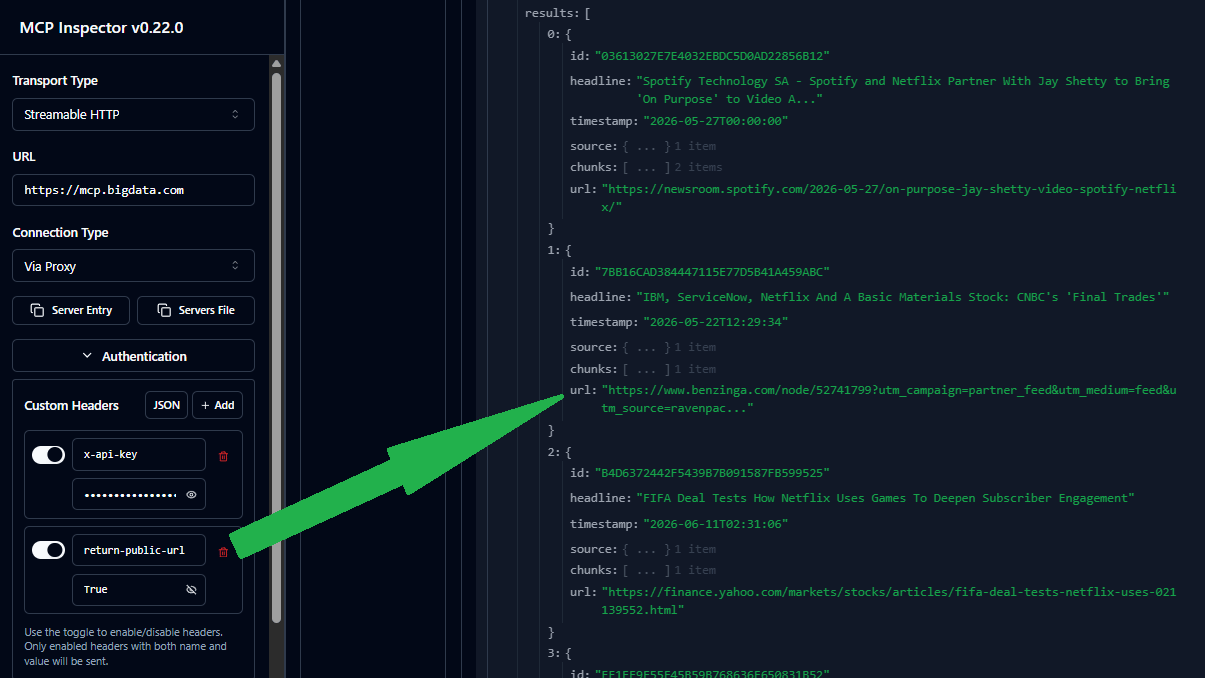 The `url` field may be empty if the document is not publicly available. In that case, the client must download the entire document using the document ID.
We also provide a [Document Viewer Widget](https://docs.bigdata.com/widgets/document-viewer-widget) that your proprietary platform can leverage to visualize the entire document.
## Usage Monitoring
The tool `bigdata_search` consumes **API Query Units** in the same way as the Search Service API. You can monitor the organization\`s usage in the [Developer Platform > Usage](https://platform.bigdata.com/usage)
## Prompt examples
Generate a concise company brief with key business insights.
Build a structured investment memo for a target company.
Prepare for upcoming earnings calls with key questions and context.
Analyze earnings call transcripts with targeted questions and answers.
The `url` field may be empty if the document is not publicly available. In that case, the client must download the entire document using the document ID.
We also provide a [Document Viewer Widget](https://docs.bigdata.com/widgets/document-viewer-widget) that your proprietary platform can leverage to visualize the entire document.
## Usage Monitoring
The tool `bigdata_search` consumes **API Query Units** in the same way as the Search Service API. You can monitor the organization\`s usage in the [Developer Platform > Usage](https://platform.bigdata.com/usage)
## Prompt examples
Generate a concise company brief with key business insights.
Build a structured investment memo for a target company.
Prepare for upcoming earnings calls with key questions and context.
Analyze earnings call transcripts with targeted questions and answers.