> ## Documentation Index
> Fetch the complete documentation index at: https://docs.bigdata.com/llms.txt
> Use this file to discover all available pages before exploring further.
# Embed the chat widget
> Add the Bigdata research chat to your website with a script tag, a backend proxy for your API key, with optional theming.
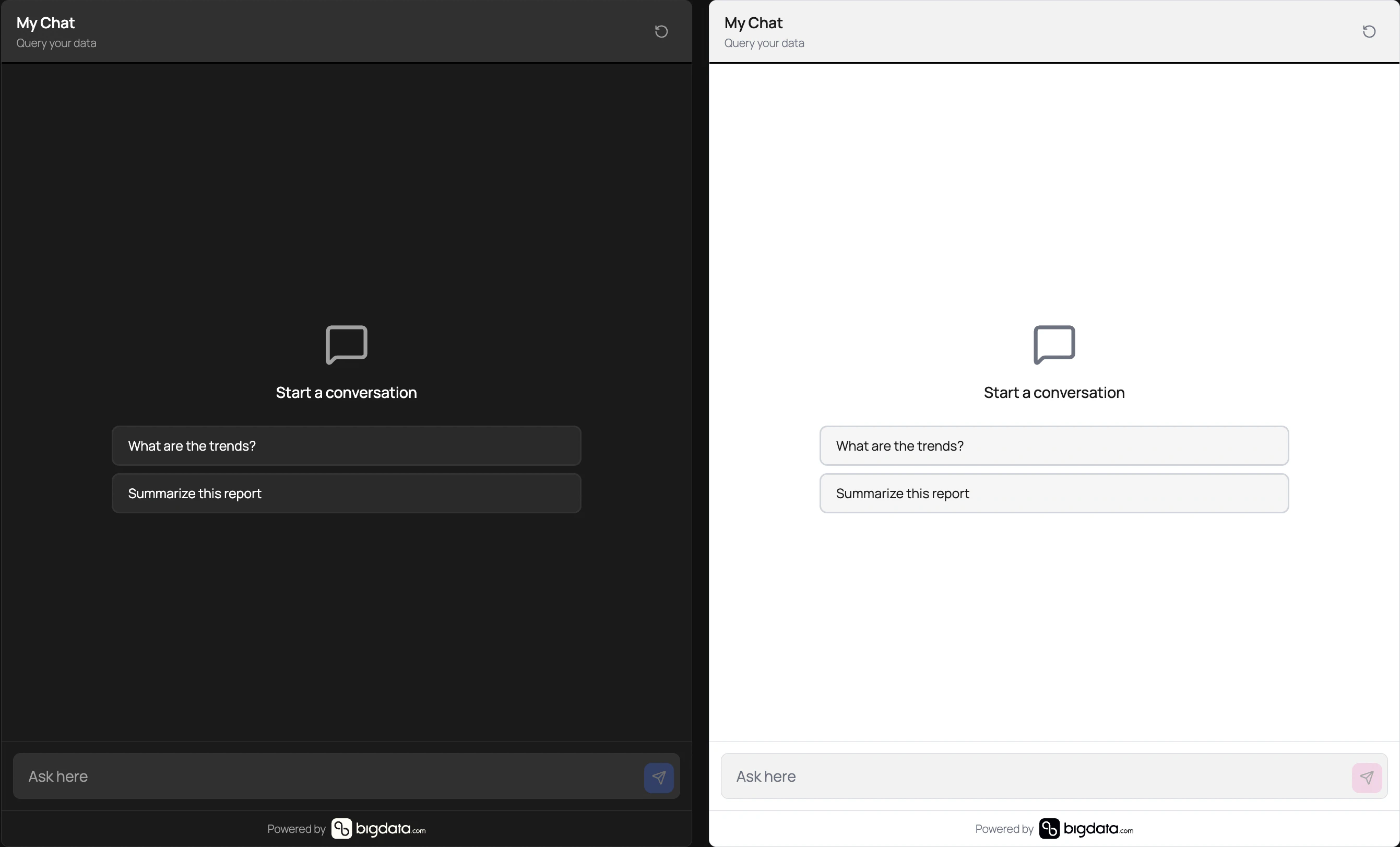
The Bigdata chat widget loads as a **single script**—no separate CSS file to host. You mount it on a container element and point it at a **URL you control**; your backend adds your Bigdata API credentials and forwards traffic to the Research Agent API.
 ## How it fits together
Traffic makes one round trip through **your** backend: the widget only knows `proxyUrl`; your server holds the Bigdata credentials and relays the streaming response.
**Where each part runs** — the chat UI and your proxy live on **your** side; the Research Agent runs in **Bigdata**’s infrastructure.
```mermaid theme={null}
flowchart LR
subgraph yours [Your infrastructure]
direction TB
FE[Chat widget]
BE[Your backend]
end
subgraph bigdata [Bigdata infrastructure]
RA[Research Agent API]
end
FE --> BE
BE --> RA
RA --> BE
BE --> FE
```
**What happens at each step** — the browser posts JSON to your URL; your server adds the API key, calls Bigdata, and streams the response back.
```mermaid theme={null}
sequenceDiagram
participant W as Chat widget
participant B as Your backend
participant A as Research Agent API
W->>B: POST application/json to proxyUrl
Note over B: Attach API key server-side
B->>A: Forward request body
A-->>B: text/event-stream SSE
B-->>W: Stream chunks to browser
```
Never put your Bigdata API key in frontend code or expose it in the browser. The widget is
designed to call **your** proxy; the proxy must attach your API key when calling Bigdata.
## Why you need a backend endpoint
End users can open developer tools and read any secret shipped to the page. The widget therefore sends chat requests to **`proxyUrl`** only. Your server (or serverless function) should:
1. Authenticate the request if needed (cookie, session, or signed token).
2. Add the Bigdata API key to the outbound request.
3. Forward the JSON body to the Research Agent endpoint and stream the response back as **Server-Sent Events (SSE)**.
The widget sends **`Content-Type: application/json`** on requests to `proxyUrl`. Your **`proxyUrl`** must be reachable from the visitor’s browser **same-origin or with correct CORS** (for example allowing `POST` and `Content-Type` when the page and API are on different origins).
For request and response field details on the Bigdata side, see [Research Agent API](/api-reference/research-agent/research-agent). A typical upstream URL is `https://agents.bigdata.com/v1/research-agent` (use the endpoint your onboarding materials specify).
If you use **WordPress**, contact [support](/support) to ask about our **Bigdata Widgets** plugin
instead of building the proxy yourself.
## Browser compatibility
The script bundle targets **modern evergreen browsers**. It is **not** supported in Internet Explorer or other legacy engines without current Web APIs.
| Browser | Guidance |
| ----------- | ---------------------------------------------------------------------------------------------------------------------------------------------------------------------------------------------------------- |
| **Chrome** | Recent stable (desktop and Android). |
| **Edge** | Recent stable (Chromium-based). |
| **Firefox** | Recent stable. |
| **Safari** | **16.4 or newer** on macOS and iOS. Earlier versions lack reliable support for **constructible stylesheets** and **`adoptedStyleSheets`** on the widget’s Shadow DOM, which the bundle uses to inject CSS. |
**Environment expectations**
* **JavaScript enabled** — the widget mounts via script and does not render without JS.
* **Streaming from your proxy** — the client reads the proxy response as **incremental** **`text/event-stream`** data over **`XMLHttpRequest`** (POST with a JSON body). Middleboxes, strict proxies, or extensions that buffer or block streaming can delay or break live token display; align with [Troubleshooting](#troubleshooting) if replies appear only after completion.
* **Third‑party cookies** — not required for the default embed pattern; auth is between the visitor’s browser and **your** `proxyUrl` (cookies or headers you set on that origin still apply).
For audiences on older locked-down browsers, contact [support](/support) to discuss feasibility.
## Quickstart
Add a wrapper element and **give it the size you want** (fixed pixels, percentage, flex, grid, or `min-height`—whatever fits your page). The widget mounts inside it and **stretches to fill** the container’s box.
```html theme={null}
```
Use the widget script URL from Bigdata. Example shape (version path may differ). Load it **before** the inline script that constructs the widget so `BigdataAgent` is defined:
```html theme={null}
```
Create the widget with `new BigdataAgent.BigdataChatWidget({ ... })`. At minimum set `container` and `proxyUrl`. Optional `config`, `theme`, and `branding` match the [configuration reference](#configuration-reference) below.
```html theme={null}
```
## Global API: `BigdataAgent`
After the bundle loads, the UMD global **`BigdataAgent`** exposes **`BigdataChatWidget`**. Instantiate it with `new BigdataAgent.BigdataChatWidget(config)`; the return value is the mounted widget instance.
| Property / method | Type | Description |
| -------------------------------- | -------- | ------------------------------------------------------------------------------------------------------------ |
| `BigdataAgent.BigdataChatWidget` | `class` | Constructor: pass the same `config` object described in [Configuration reference](#configuration-reference). |
| `BigdataChat.version` | `string` | On `window`: build version string (diagnostics). |
| `BigdataChat.buildTimestamp` | `string` | On `window`: build timestamp string (diagnostics). |
Store the instance from `new BigdataAgent.BigdataChatWidget(...)` if you need to call `destroy()` or attach listeners.
## Proxy contract (summary)
| Aspect | Expected behavior |
| ---------------------- | ---------------------------------------------------------------------------------------------------------------------------------------------------------------------------------------------------------------------------------------------- |
| HTTP method | **POST** to `proxyUrl` |
| Request `Content-Type` | `application/json` |
| Request body | JSON including at least `chat_id`, `message`, `research_effort`, `tools_configs`, and `from_interaction_id` (the widget generates these fields; align your proxy with the [Research Agent API](/api-reference/research-agent/research-agent)). |
| Response | `Content-Type: text/event-stream` with SSE `data:` frames the widget can parse |
If streaming appears only after the full response completes, your stack may be **buffering** the response; the proxy and any reverse proxy must support streaming.
## Configuration reference
### Top-level options
| Option | Type | Description |
| ------------ | ------------------------- | ---------------------------------------------------------------------------------------------------------------------- |
| `container` | `string` or `HTMLElement` | **Required.** Where the widget mounts: a CSS selector that `document.querySelector` resolves, or a DOM element. |
| `proxyUrl` | `string` | **Required.** Your backend URL that forwards requests to the Research Agent. |
| `instanceId` | `string` | Optional. Stable id for this instance when several widgets share a page; if omitted, the implementation uses `"chat"`. |
| `manager` | `BigdataWidgetManager` | Optional. Shared manager across widgets for coordinated events and a common base theme. |
| `config` | `object` | Optional. Research and UX settings; see **`config` (research and UX)** below. |
| `theme` | `object` | Optional. Visual settings; see **`theme`** below. |
| `branding` | `object` | Optional. Footer branding; see **`branding`** below. |
### `config` (research and UX)
| Field | Type | Description |
| ---------------------- | ------------------------ | ---------------------------------------------------------------------------------------------------------------------------------- |
| `researchEffort` | `"lite"` \| `"standard"` | Depth / execution mode for agent runs; defaults to `"standard"` if omitted. |
| `suggestedQuestions` | `string[]` | Optional starter prompts in the UI. |
| `showAdvancedControls` | `boolean` | Shows advanced input controls when `true`. |
| `inlineAttribution` | `boolean` | Inline attribution behavior when supported. |
| `placeholder` | `string` | Input placeholder (max 200 characters). |
| `headerTitle` | `string` | Header title (max 100 characters). |
| `headerSubtitle` | `string` | Header subtitle (max 200 characters). |
| `categoryFilter` | object | Restrict categories: `{ mode: "INCLUDE" \| "EXCLUDE", values: string[] }` (values are category identifiers your integration uses). |
### `theme`
The widget runs inside an **open Shadow DOM**, so host-page CSS does not change its internal layout or colors. **Size the mount container** in your page; the widget **fills that container**. You can also set **`theme.width`** and **`theme.height`** if you need explicit dimensions on the widget instead of relying on the container alone.
Theme values are merged with defaults. **`preset`** chooses a base palette before overrides:
| `preset` | Behavior |
| -------- | -------------------------------------------------------------- |
| `light` | Light background and text colors. |
| `dark` | Dark background and text colors. |
| `auto` | Follows the user’s system preference (`prefers-color-scheme`). |
| Field | Type | Description |
| -------------------- | --------------------------------- | ----------------------------------------------------------------------- |
| `primaryColor` | `string` | Accents (buttons, links). |
| `backgroundColor` | `string` | Widget background. |
| `surfaceColor` | `string` | Cards / message surfaces. |
| `textColor` | `string` | Primary text. |
| `textSecondaryColor` | `string` | Muted text. |
| `borderColor` | `string` | Borders and dividers. |
| `fontFamily` | `string` | Font stack; defaults to `"inherit"` (uses the host page’s font family). |
| `fontSize` | `string` | Base size; defaults to `"16px"`. |
| `borderRadius` | `string` | Corner radius (e.g. `"8px"`). |
| `width` | `string` | Optional fixed width when not using a fully sized container. |
| `height` | `string` | Optional fixed height when not using a fully sized container. |
| `preset` | `"light"` \| `"dark"` \| `"auto"` | Base palette; see table above. |
### `branding`
| Field | Type | Description |
| --------------- | --------- | --------------------------------------------------------------------------------- |
| `showPoweredBy` | `boolean` | Whether to show the “Powered by” footer; defaults to `true`. Set `false` to hide. |
| `logoUrl` | `string` | Optional custom logo URL. |
## Multiple widgets and shared theming
Create one **`BigdataWidgetManager`** with an optional shared `theme`, pass it as `manager` in each `new BigdataAgent.BigdataChatWidget({ ... })` config, and give each widget a distinct **`instanceId`**. That way instances stay isolated but can share base styling.
## Instance lifecycle and events
* **`destroy()`** — Unmounts React, clears the shadow root, and unregisters the instance. Call this when removing the widget from the page.
* **`addListener(event, handler)`** / **`removeListener(event, handler)`** — Subscribe to widget events.
Event payloads include `instanceName`, `timestamp`, and `data`:
| Event | `data` shape (summary) |
| --------------- | ---------------------------------------------------------- |
| `ready` | `{ widgetName: string }` |
| `chatmessage` | `{ prompt: string, researchEffort: "lite" \| "standard" }` |
| `updatefilters` | `{ categoryFilter?: { mode, values } }` |
| `opendocument` | `{ documentId: string, isPrivate: boolean }` |
| `openlink` | `{ url: string }` |
Advanced: to trigger a send from your own UI, you can **`emit("chatmessage", { prompt, researchEffort })`** on the same instance the widget uses (same `researchEffort` values as in the table above).
## Troubleshooting
Confirm the script URL loads (network tab, no 404). Ensure `container` matches an existing
element. Check the browser console for validation errors (for example invalid `proxyUrl`).
Your `proxyUrl` origin must allow the site origin that embeds the widget
(`Access-Control-Allow-Origin` and related headers for `POST`).
The proxy is rejecting the request before Bigdata. Verify server-side auth and that forwarded
credentials match what your Bigdata integration expects.
Disable or reconfigure response buffering on your proxy, load balancer, or framework so
`text/event-stream` is flushed incrementally.
For personalized help, use [Support](/support).
## How it fits together
Traffic makes one round trip through **your** backend: the widget only knows `proxyUrl`; your server holds the Bigdata credentials and relays the streaming response.
**Where each part runs** — the chat UI and your proxy live on **your** side; the Research Agent runs in **Bigdata**’s infrastructure.
```mermaid theme={null}
flowchart LR
subgraph yours [Your infrastructure]
direction TB
FE[Chat widget]
BE[Your backend]
end
subgraph bigdata [Bigdata infrastructure]
RA[Research Agent API]
end
FE --> BE
BE --> RA
RA --> BE
BE --> FE
```
**What happens at each step** — the browser posts JSON to your URL; your server adds the API key, calls Bigdata, and streams the response back.
```mermaid theme={null}
sequenceDiagram
participant W as Chat widget
participant B as Your backend
participant A as Research Agent API
W->>B: POST application/json to proxyUrl
Note over B: Attach API key server-side
B->>A: Forward request body
A-->>B: text/event-stream SSE
B-->>W: Stream chunks to browser
```
Never put your Bigdata API key in frontend code or expose it in the browser. The widget is
designed to call **your** proxy; the proxy must attach your API key when calling Bigdata.
## Why you need a backend endpoint
End users can open developer tools and read any secret shipped to the page. The widget therefore sends chat requests to **`proxyUrl`** only. Your server (or serverless function) should:
1. Authenticate the request if needed (cookie, session, or signed token).
2. Add the Bigdata API key to the outbound request.
3. Forward the JSON body to the Research Agent endpoint and stream the response back as **Server-Sent Events (SSE)**.
The widget sends **`Content-Type: application/json`** on requests to `proxyUrl`. Your **`proxyUrl`** must be reachable from the visitor’s browser **same-origin or with correct CORS** (for example allowing `POST` and `Content-Type` when the page and API are on different origins).
For request and response field details on the Bigdata side, see [Research Agent API](/api-reference/research-agent/research-agent). A typical upstream URL is `https://agents.bigdata.com/v1/research-agent` (use the endpoint your onboarding materials specify).
If you use **WordPress**, contact [support](/support) to ask about our **Bigdata Widgets** plugin
instead of building the proxy yourself.
## Browser compatibility
The script bundle targets **modern evergreen browsers**. It is **not** supported in Internet Explorer or other legacy engines without current Web APIs.
| Browser | Guidance |
| ----------- | ---------------------------------------------------------------------------------------------------------------------------------------------------------------------------------------------------------- |
| **Chrome** | Recent stable (desktop and Android). |
| **Edge** | Recent stable (Chromium-based). |
| **Firefox** | Recent stable. |
| **Safari** | **16.4 or newer** on macOS and iOS. Earlier versions lack reliable support for **constructible stylesheets** and **`adoptedStyleSheets`** on the widget’s Shadow DOM, which the bundle uses to inject CSS. |
**Environment expectations**
* **JavaScript enabled** — the widget mounts via script and does not render without JS.
* **Streaming from your proxy** — the client reads the proxy response as **incremental** **`text/event-stream`** data over **`XMLHttpRequest`** (POST with a JSON body). Middleboxes, strict proxies, or extensions that buffer or block streaming can delay or break live token display; align with [Troubleshooting](#troubleshooting) if replies appear only after completion.
* **Third‑party cookies** — not required for the default embed pattern; auth is between the visitor’s browser and **your** `proxyUrl` (cookies or headers you set on that origin still apply).
For audiences on older locked-down browsers, contact [support](/support) to discuss feasibility.
## Quickstart
Add a wrapper element and **give it the size you want** (fixed pixels, percentage, flex, grid, or `min-height`—whatever fits your page). The widget mounts inside it and **stretches to fill** the container’s box.
```html theme={null}
```
Use the widget script URL from Bigdata. Example shape (version path may differ). Load it **before** the inline script that constructs the widget so `BigdataAgent` is defined:
```html theme={null}
```
Create the widget with `new BigdataAgent.BigdataChatWidget({ ... })`. At minimum set `container` and `proxyUrl`. Optional `config`, `theme`, and `branding` match the [configuration reference](#configuration-reference) below.
```html theme={null}
```
## Global API: `BigdataAgent`
After the bundle loads, the UMD global **`BigdataAgent`** exposes **`BigdataChatWidget`**. Instantiate it with `new BigdataAgent.BigdataChatWidget(config)`; the return value is the mounted widget instance.
| Property / method | Type | Description |
| -------------------------------- | -------- | ------------------------------------------------------------------------------------------------------------ |
| `BigdataAgent.BigdataChatWidget` | `class` | Constructor: pass the same `config` object described in [Configuration reference](#configuration-reference). |
| `BigdataChat.version` | `string` | On `window`: build version string (diagnostics). |
| `BigdataChat.buildTimestamp` | `string` | On `window`: build timestamp string (diagnostics). |
Store the instance from `new BigdataAgent.BigdataChatWidget(...)` if you need to call `destroy()` or attach listeners.
## Proxy contract (summary)
| Aspect | Expected behavior |
| ---------------------- | ---------------------------------------------------------------------------------------------------------------------------------------------------------------------------------------------------------------------------------------------- |
| HTTP method | **POST** to `proxyUrl` |
| Request `Content-Type` | `application/json` |
| Request body | JSON including at least `chat_id`, `message`, `research_effort`, `tools_configs`, and `from_interaction_id` (the widget generates these fields; align your proxy with the [Research Agent API](/api-reference/research-agent/research-agent)). |
| Response | `Content-Type: text/event-stream` with SSE `data:` frames the widget can parse |
If streaming appears only after the full response completes, your stack may be **buffering** the response; the proxy and any reverse proxy must support streaming.
## Configuration reference
### Top-level options
| Option | Type | Description |
| ------------ | ------------------------- | ---------------------------------------------------------------------------------------------------------------------- |
| `container` | `string` or `HTMLElement` | **Required.** Where the widget mounts: a CSS selector that `document.querySelector` resolves, or a DOM element. |
| `proxyUrl` | `string` | **Required.** Your backend URL that forwards requests to the Research Agent. |
| `instanceId` | `string` | Optional. Stable id for this instance when several widgets share a page; if omitted, the implementation uses `"chat"`. |
| `manager` | `BigdataWidgetManager` | Optional. Shared manager across widgets for coordinated events and a common base theme. |
| `config` | `object` | Optional. Research and UX settings; see **`config` (research and UX)** below. |
| `theme` | `object` | Optional. Visual settings; see **`theme`** below. |
| `branding` | `object` | Optional. Footer branding; see **`branding`** below. |
### `config` (research and UX)
| Field | Type | Description |
| ---------------------- | ------------------------ | ---------------------------------------------------------------------------------------------------------------------------------- |
| `researchEffort` | `"lite"` \| `"standard"` | Depth / execution mode for agent runs; defaults to `"standard"` if omitted. |
| `suggestedQuestions` | `string[]` | Optional starter prompts in the UI. |
| `showAdvancedControls` | `boolean` | Shows advanced input controls when `true`. |
| `inlineAttribution` | `boolean` | Inline attribution behavior when supported. |
| `placeholder` | `string` | Input placeholder (max 200 characters). |
| `headerTitle` | `string` | Header title (max 100 characters). |
| `headerSubtitle` | `string` | Header subtitle (max 200 characters). |
| `categoryFilter` | object | Restrict categories: `{ mode: "INCLUDE" \| "EXCLUDE", values: string[] }` (values are category identifiers your integration uses). |
### `theme`
The widget runs inside an **open Shadow DOM**, so host-page CSS does not change its internal layout or colors. **Size the mount container** in your page; the widget **fills that container**. You can also set **`theme.width`** and **`theme.height`** if you need explicit dimensions on the widget instead of relying on the container alone.
Theme values are merged with defaults. **`preset`** chooses a base palette before overrides:
| `preset` | Behavior |
| -------- | -------------------------------------------------------------- |
| `light` | Light background and text colors. |
| `dark` | Dark background and text colors. |
| `auto` | Follows the user’s system preference (`prefers-color-scheme`). |
| Field | Type | Description |
| -------------------- | --------------------------------- | ----------------------------------------------------------------------- |
| `primaryColor` | `string` | Accents (buttons, links). |
| `backgroundColor` | `string` | Widget background. |
| `surfaceColor` | `string` | Cards / message surfaces. |
| `textColor` | `string` | Primary text. |
| `textSecondaryColor` | `string` | Muted text. |
| `borderColor` | `string` | Borders and dividers. |
| `fontFamily` | `string` | Font stack; defaults to `"inherit"` (uses the host page’s font family). |
| `fontSize` | `string` | Base size; defaults to `"16px"`. |
| `borderRadius` | `string` | Corner radius (e.g. `"8px"`). |
| `width` | `string` | Optional fixed width when not using a fully sized container. |
| `height` | `string` | Optional fixed height when not using a fully sized container. |
| `preset` | `"light"` \| `"dark"` \| `"auto"` | Base palette; see table above. |
### `branding`
| Field | Type | Description |
| --------------- | --------- | --------------------------------------------------------------------------------- |
| `showPoweredBy` | `boolean` | Whether to show the “Powered by” footer; defaults to `true`. Set `false` to hide. |
| `logoUrl` | `string` | Optional custom logo URL. |
## Multiple widgets and shared theming
Create one **`BigdataWidgetManager`** with an optional shared `theme`, pass it as `manager` in each `new BigdataAgent.BigdataChatWidget({ ... })` config, and give each widget a distinct **`instanceId`**. That way instances stay isolated but can share base styling.
## Instance lifecycle and events
* **`destroy()`** — Unmounts React, clears the shadow root, and unregisters the instance. Call this when removing the widget from the page.
* **`addListener(event, handler)`** / **`removeListener(event, handler)`** — Subscribe to widget events.
Event payloads include `instanceName`, `timestamp`, and `data`:
| Event | `data` shape (summary) |
| --------------- | ---------------------------------------------------------- |
| `ready` | `{ widgetName: string }` |
| `chatmessage` | `{ prompt: string, researchEffort: "lite" \| "standard" }` |
| `updatefilters` | `{ categoryFilter?: { mode, values } }` |
| `opendocument` | `{ documentId: string, isPrivate: boolean }` |
| `openlink` | `{ url: string }` |
Advanced: to trigger a send from your own UI, you can **`emit("chatmessage", { prompt, researchEffort })`** on the same instance the widget uses (same `researchEffort` values as in the table above).
## Troubleshooting
Confirm the script URL loads (network tab, no 404). Ensure `container` matches an existing
element. Check the browser console for validation errors (for example invalid `proxyUrl`).
Your `proxyUrl` origin must allow the site origin that embeds the widget
(`Access-Control-Allow-Origin` and related headers for `POST`).
The proxy is rejecting the request before Bigdata. Verify server-side auth and that forwarded
credentials match what your Bigdata integration expects.
Disable or reconfigure response buffering on your proxy, load balancer, or framework so
`text/event-stream` is flushed incrementally.
For personalized help, use [Support](/support).