

Overview
Financial institutions often struggle to produce research reports that are consistent in precision, depth of reasoning, and output format. After key financial events, teams face intense time pressure and fragmented workflows, which leads to uneven quality, inconsistent structure, and delayed coverage. These skills guide LLMs through a repeatable research-and-writing process, while the Bigdata MCP tools provide direct access to Bigdata premium content for sourcing, validation, and contextual analysis. ✅ Reports can be generated quickly, at scale, and in a standardized format across the full portfolio.Available Skills
Each skill is called by name, or your agent picks the right one from a plain request:- Type
/followed by the skill name, for example/bigdata any financial questionor/bigdata-earnings-preview GOOGL. - Or just describe what you need, such as “create an earnings preview for GOOGL”, and the matching skill runs on its own.
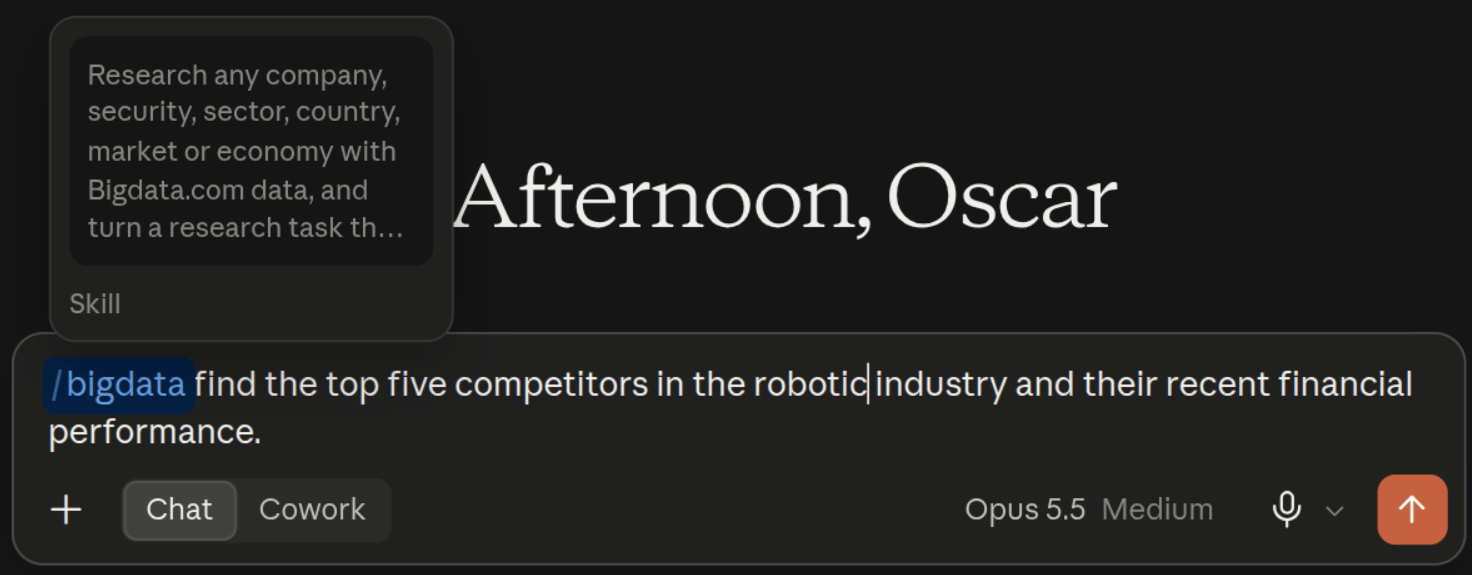
Entry point
Thebigdata skill is the place to start when you are not sure which skill fits. Type /bigdata to ask what Bigdata.com can do, run any research task that no more specific skill covers, or turn a task you repeat into a skill of your own.
Public securities
Pre-IPO and newly listed
Macro
Related Resources
Claude MCP Integration
Learn how to configure the Bigdata.com MCP connector in Claude
Install Bigdata plugin
Step-by-step installation guides for Claude, ChatGPT, and VS Code