

May 22, 2026
Widgets, Chat Widget, Document Viewer/5 minutes read
Introducing Bigdata Widgets: a one-line embed that puts our Research Agent inside any app, on any stack, with your brand on it.
Every team building with AI eventually hits the same wall. You have the model. You have the data. You have the API key. And then you spend the next six weeks wiring up streaming, building a citation UI, taming markdown rendering, debugging token-by-token updates, and arguing about whether the chat bubbles should be rounded on all four corners or just three. The interesting part of the work (the research, the insights, the answers your users actually came for) gets buried under frontend plumbing. We built the Chat Widget and the Document Viewer Widget to remove that wall entirely.
The Chat Widget
The Chat Widget makes Bigdata’s Research Agent embeddable in any web application with a single code snippet. Drop a<div>, drop a <script>, and you have a fully functional, fully branded AI research assistant running in production.
No streaming logic to maintain. No attribution layer to build. No design system to reconcile. Just an embeddable surface that handles all of it for you.
What you get out of the box
The screenshots below are from platform.bigdata.com/widgets, the Developer Platform playground for both widgets. Configure branding, preview the Chat Widget and Document Viewer live, and copy living embed snippets (HTML, React, Node.js Proxy, Python Proxy) you can plug straight into your app.
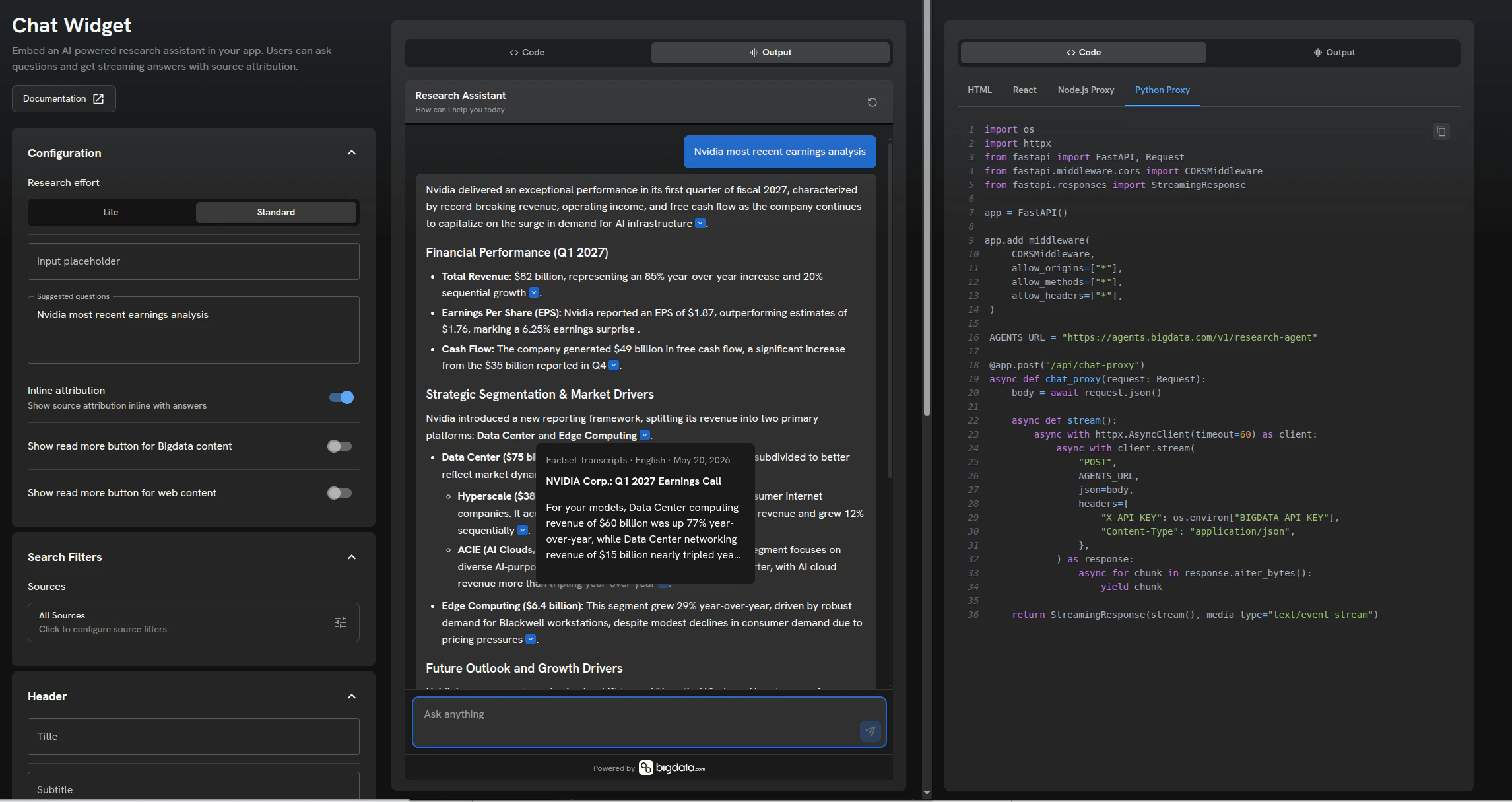
Chat Widget playground on platform.bigdata.com: live preview and copy-ready embed snippets
The Document Viewer Widget
The Document Viewer Widget lets you embed rich Bigdata document experiences directly inside your own sites and applications: no redirects, no context switching, no loss of workflow. It is the natural complement to the Chat Widget. When the Research Agent answers a question and cites a source, the Document Viewer Widget completes that workflow. Users can click any citation, load the underlying document, and read it in-context, all without leaving your application. But the viewer goes further than simply loading a document. It automatically scrolls to the exact paragraph referenced by the Research Agent and highlights the specific content that was used to generate the insight. Users don’t have to hunt for the relevant passage: they land on it instantly.Key Capabilities
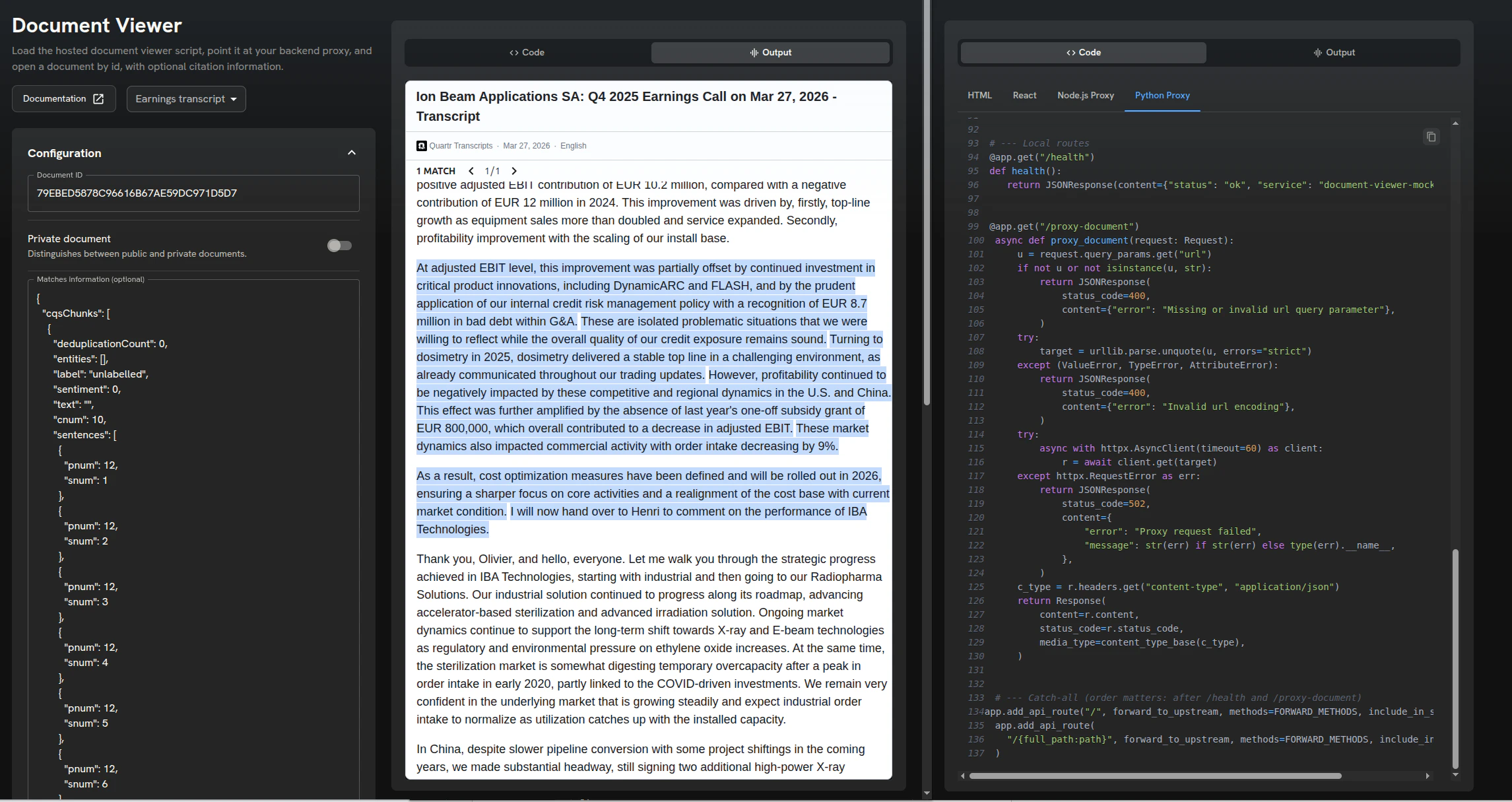
Document Viewer playground on platform.bigdata.com: configure, preview, and copy embed code
Together: A complete research workflow
The two widgets are designed to work independently, but connecting them makes the difference between a good AI experience and a great one.A user asks a question in the Chat Widget. The Research Agent responds with an analysis and inline source citations. The user clicks a citation. The Document Viewer Widget opens the source document, scrolls directly to the referenced paragraph, and highlights the exact content the Agent used.The full loop (question, answer, evidence) happens inside your application. Users never lose context. The experience is coherent, credible, and entirely within your brand.
Who this is for
Research and investment teams who want a branded research assistant in their investor portal or client dashboard without commissioning a six-month engineering project. SaaS platforms adding AI-powered document research as a feature, without staffing a team to maintain streaming and attribution logic forever. Internal analyst tools that need earnings, filings, and news intelligence scoped to a specific universe of sources and workflows. Sales and product teams building demos for prospects or stakeholders before committing real engineering resources. Configure it in an afternoon, demo it the next morning.Why it matters
There is a real cost, measured in months, not weeks, between having access to a powerful research model and shipping it to end users. For most teams, that cost is the reason “AI features” stay stuck in the roadmap section labeled next quarter. The Chat Widget collapses that gap. The frontend work that used to stand between an API key and a production-ready AI research experience is now handled. Configure visually. Preview live. Deploy in minutes. The engineering team gets to focus on the parts of the product only they can build. The research team gets a fully functional assistant their users can actually use today.Try it
If you’re building anything that involves users asking questions of financial documents, news, or filings, and you’ve been quietly dreading the frontend work, this is for you. What used to be a sprint is now a copy-paste. Reach out at sales@ravenpack.com or visit www.bigdata.com to see the Chat Widget in action. Full documentation for both widgets is available in Bigdata docs. If you already have access to Bigdata, head to platform.bigdata.com/widgets. The playgrounds there mirror what you see in the screenshots above: configure both widgets, preview them live, and grab living embed snippets you can plug and play into any stack, with no separate build step required.
Víctor Pimentel Naranjo
Senior Product Manager, Team Lead

Raul Balanzino
Product Manager (VP)