investment_research connector as private documents. This guide follows the same end-to-end workflow as the Investment Research Connector tutorial on Google Colab: authenticate, create the connector, audit ingestion, discover broker tags, then run Search and Research Agent with filters scoped to that corpus.
Private & Secure: No LLM training on your data
X-API-KEY header. See Authentication for key handling.

End-to-end workflow
After the connector syncs, Bigdata enriches each report (extraction, structure, and annotation) and indexes it for the Search Service and Research Agent. The steps below mirror the notebook.1
Set up authentication
Send your API key on every request (repeat the two headers on each call below, or set a shell variable you expand into Broker credentials are used only when creating the connector (see Create connector); they are not returned or updatable via the update-connector API.
-H flags):2
Create an investment research connector
POST The response includes
/contents/v1/connectors with type: "investment_research" and broker credentials in config. Set share_with_org if colleagues should see ingested documents.connector_id. Save it for listing documents and for dashboards; ingestion runs asynchronously after creation.3
Optional: keep only recent research with a rolling history window
By default the connector keeps all the research it ingests. If you only need a recent window, set A scheduled job then deletes the connector’s documents published on or before today (UTC) minus Send
rolling_history_days (an integer from 30 to 3650) so the connector keeps only research published within that many days. You can set it in config when you create the connector, or change it later with Trigger connector sync. The field is returned in config when you list or get connectors, and is null when no window is set.rolling_history_days, and later syncs do not ingest them again. Documents still being processed are skipped until a later run.The connector’s date_limit cannot be older than the start of the window. If a request sets date_limit or rolling_history_days and the date_limit that applies (the one you send, or the stored one, which defaults to three months back) is older than the start of the window, the API returns 400 with the error code ROLLING_HISTORY_CONFLICT, a message naming both values, and changes nothing. For example, a 60-day window is shorter than the default three-month date limit, so send a date_limit no older than 60 days ago in the same request:{ "rolling_history_days": null } to turn the window off.4
Audit synced documents and processing status
GET List documents with Each document has
connector=<connector_id> (and optionally ownership=all) and paginate with page / page_size. Sort by created_at to see the newest items first.status: processing while enrichment runs, then completed when it is ready for Search and Research Agent. You can also use Get document metadata on a single id for detail.You can confirm broker-ingested items with origin=investment_research when listing across connectors; each item still includes request_origin, connector_id, and tags.5
List broker tags and pick a filter
Ingested reports get automatic tags such as The Colab notebook picks the tag with the highest
broker:<broker_name>. GET /contents/v1/tags with prefix=broker: to list broker tags and their file_count.file_count as a convenience filter for the next steps; you can pass any broker tag (or several) into Search and Research Agent filters.6
Query with the Search API
POST The notebook renders hits in a small table and builds links to open a hit in the app, for example
/v1/search with query.text and query.filters so results stay on your private investment research archive. Typical combinations (see Query filters):- Category: Category filter with
mode: "INCLUDE"andvalues: ["my_files"]limits hits to your private content (same as My Files in the Developer Platform). - Source: Source filter, include the Investment Research source id for your workspace (the Colab example uses
E5A77C; confirm the id you need in your environment). - Document taxonomy: Investment research document types, e.g.
INVESTMENT-RESEARCHwith subtypeCOMPANY_REPORT. - Broker tag: File tag filter,
tag.any_ofwith yourbroker:...name.
https://app.bigdata.com/documents/{id}?private=true&cnum={chunk} using the Search hit id and first chunk number.7
Query with the Research Agent API
For summarization and question answering over the same corpus, POST to
https://agents.bigdata.com/v1/research-agent with a user message and tools_configs.search.query_filters aligned with the Search filters above: tags (broker tag) and content scoped to the Investment Research source id.The Research Agent returns a stream of events (data: ... lines). The Colab notebook buffers ANSWER events until COMPLETE, then optionally parses AUDIT traces to show which chunks grounded the reply. Same buffering pattern as Non-streaming response.For parameter details, see the Research Agent API. Try the Research Agent playground with My Files / your private sources selected in the UI for an interactive equivalent.Search and Research Agent in the Developer Platform
In the Developer Platform, open Search or Research Agent, use the source selector, and limit results to My Files category or Investment Research source within this category to interact with this content.Search Service Playground
Search across private investment research and other sources; use the source selector and filters to match the API workflow above.
Research Agent Playground
Ground answers in broker research by scoping tools to private content and the same tags or sources you use in the API.
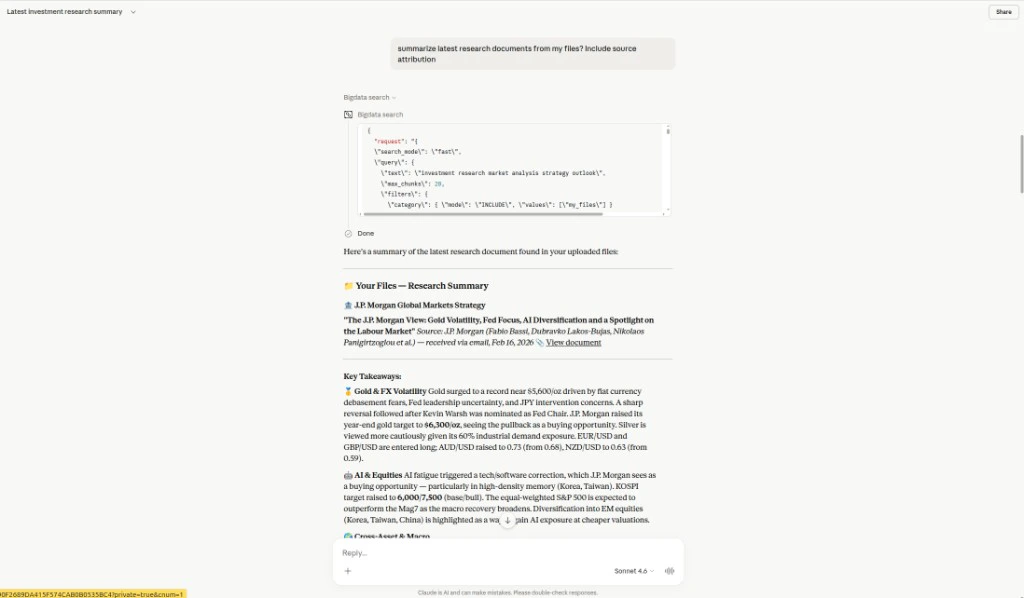
Claude and Bigdata MCP
You can work with your broker research the same way in Claude once the Bigdata MCP integration for Claude is enabled for your workspace. Claude can call thebigdata_search tool (see bigdata_search) to run semantic search over your corpus and pass the returned chunks into the conversation as grounding context.
Ask in natural language, for example:
Summarize the latest research documents from my files. Include source attribution.Claude will typically issue a search with filters such as
category set to my_files so results stay in your private content (uploads, connector-backed research, and other ingested files visible to your account). It merges the retrieved excerpts with your instructions and can cite titles, publishers, and links in the reply, similar to scoping My Files in the API or Developer Platform.