

Overview
Thebigdata_search tool is a search engine for financial documents, earnings call transcripts, news articles, analyst reports, your private uploaded files, SEC filings, and business content from thousands of companies and sources. It returns document chunks with full context, timestamps, and source attribution (URL). Ideal for research, analysis, fact-finding, and gathering company-specific information.
Request object
It supports different
query parameters depending on search_mode. For more detail on how fast and smart modes differ, see Fast vs smart search.
- fast search_mode
- smart search_mode
request: You can copy and paste it in the MCP Inspector to test it out.
Search request example (fast mode)
Provide at least one of
query.text, query.texts or a filter in query.filters. None of them is required on its own, so a search made only of filters is valid.Filters
Filters go insiderequest.query.filters and can be combined with each other.Original language
Content is searchable in English whatever language it was published in. Setquery.filters.original_language when the source language itself matters.Codes are lowercase ISO 639-1 (
en, de, ja), plus zh-Hans and zh-Hant for Simplified and Traditional Chinese. They are not checked against a fixed list, since new original languages are onboarded over time.Input is stripped, lowercased, deduplicated, and sorted. zh-hans and zh-hant are restored to zh-Hans and zh-Hant, so "JA" and "zh-hant" become ["ja", "zh-Hant"].Response object
The response contains aresults array, where each element represents a matching document with the following fields:
Search example response
Returning the original document URL
By default, thebigdata_search tool returns the Bigdata App URL of the cited document in the url response parameter. Users who authenticated to the Bigdata MCP with their Bigdata username and password can open that document directly in the Bigdata App.
However, if your proprietary platform uses a single authentication credential or API Key to access the MCP and serve multiple clients, your end users will not have access to the Bigdata App. In that case, you can instruct the MCP server to return the original (public) URL of the document in the url response parameter instead of a link to the Bigdata App.
To do this, your proprietary platform must add the header parameter return-public-url with a value of True:
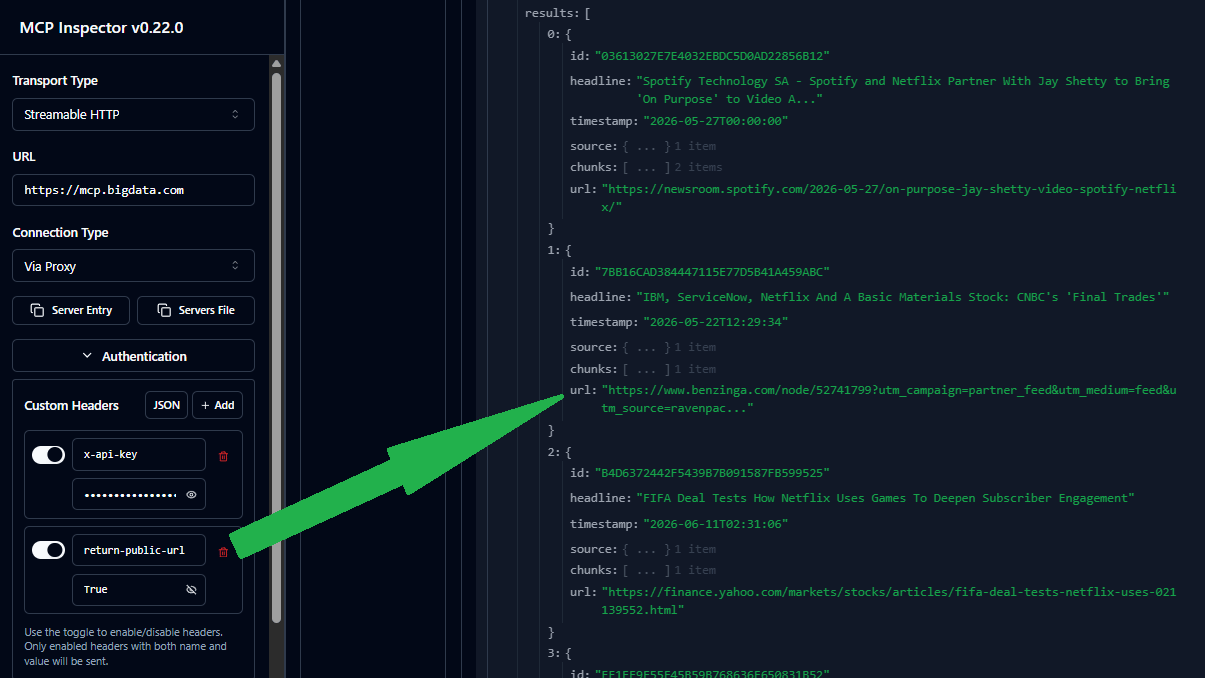
The
url field may be empty if the document is not publicly available. In that case, the client must download the entire document using the document ID.Usage Monitoring
The toolbigdata_search consumes API Query Units in the same way as the Search Service API. You can monitor the organization`s usage in the Developer Platform > Usage
Prompt examples
Company Brief
Generate a concise company brief with key business insights.
Investment Memo
Build a structured investment memo for a target company.
Earnings Preview
Prepare for upcoming earnings calls with key questions and context.
Earnings Q&A
Analyze earnings call transcripts with targeted questions and answers.