

Overview
The other Bigdata.com MCP tools each return a fixed set of information. A tearsheet, for example, always returns the same data points for a company, limited to the time frame and scope built into the tool. That works well for common questions, but it has two drawbacks:- Limited reach: If the data point or time period you need is not part of the tool’s response, the agent cannot get it.
- Context window overload: For many use cases the response is broader than needed. The agent receives large payloads it does not use, which fills its context window and leaves less room for reasoning.
bigdata_computer solves both problems. It runs Python in a sandbox connected to Bigdata.com through an authenticated client, so the agent can:
- Reach any data point: Query the Bigdata.com API endpoints directly and request exactly the data and time range the question needs, point in time.
- Compute before returning: Filter, aggregate, rank, and calculate inside the sandbox, so only the final insight reaches the agent instead of the raw data.
When to Use
bigdata_computer is ideal for:
- Calculations across companies: Comparing ratios such as gross margin or revenue growth across a peer group
- Screens over a watchlist: Ranking or filtering a list of companies by price returns, fundamentals, or other metrics
- Custom time ranges: Pulling prices, financials, or search volume for the exact periods a question requires
- Multi-step analysis: Loading and cleaning data once, then reshaping, comparing, and charting it in later steps
- Charts: Rendering a chart from the computed data
Available Data
Inside the sandbox, the agent can access:- Prices and returns
- Company fundamentals and financials
- Company profiles and peers
- Search aggregations, such as co-mentions and volume over time
- Entity lookup by name or ticker
- Fund and portfolio holdings
- Chart rendering
pandas and numpy are preloaded.
How It Works
- Write a cell: The agent sends Python code with a short
intentdescribing its goal, for example “Compare NVIDIA and AMD gross margins” - Run in the sandbox: The code fetches data through the client and computes the result
- Return the output: Only what the cell prints comes back to the agent, never the value of its last expression
- Continue the session: The agent passes the returned
session_idon later calls, so new cells can reuse the variables, dataframes, and files created earlier - Close the session: On the last cell, the agent sets
close_sessiontotrueto free the sandbox
Example
Prompt
Output
- Text
- Dashboard
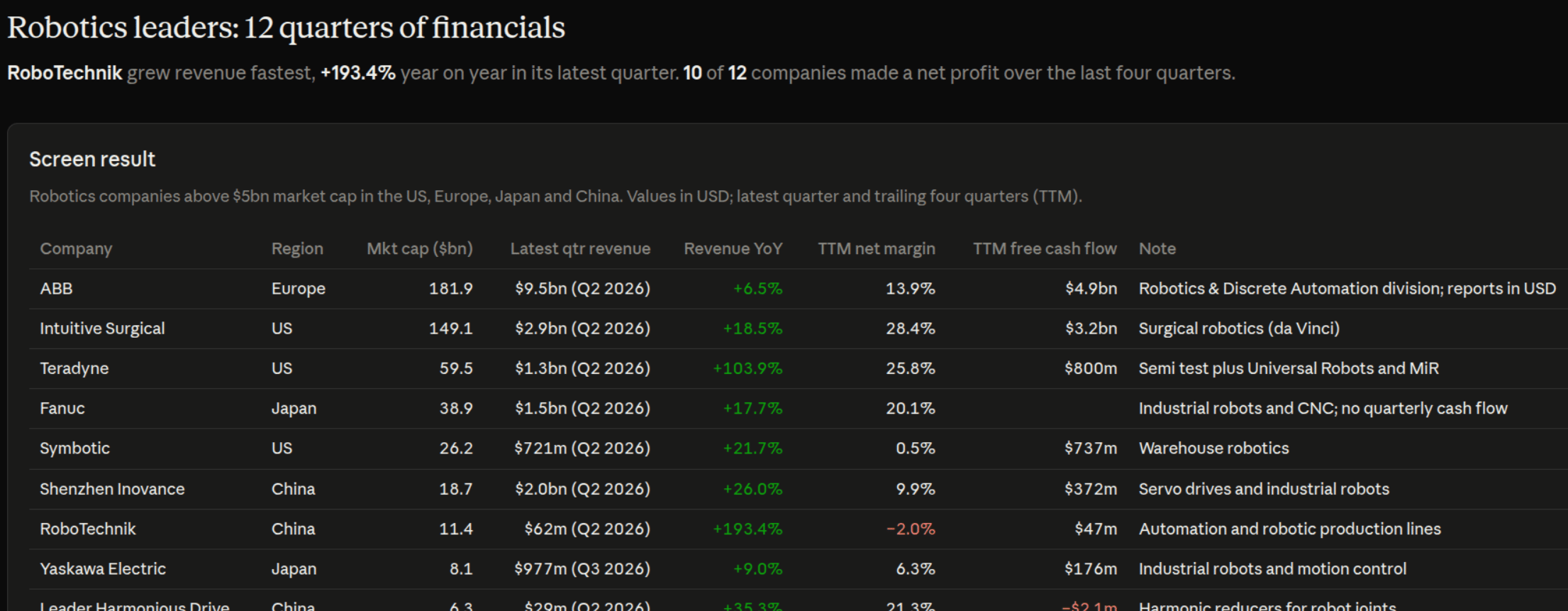
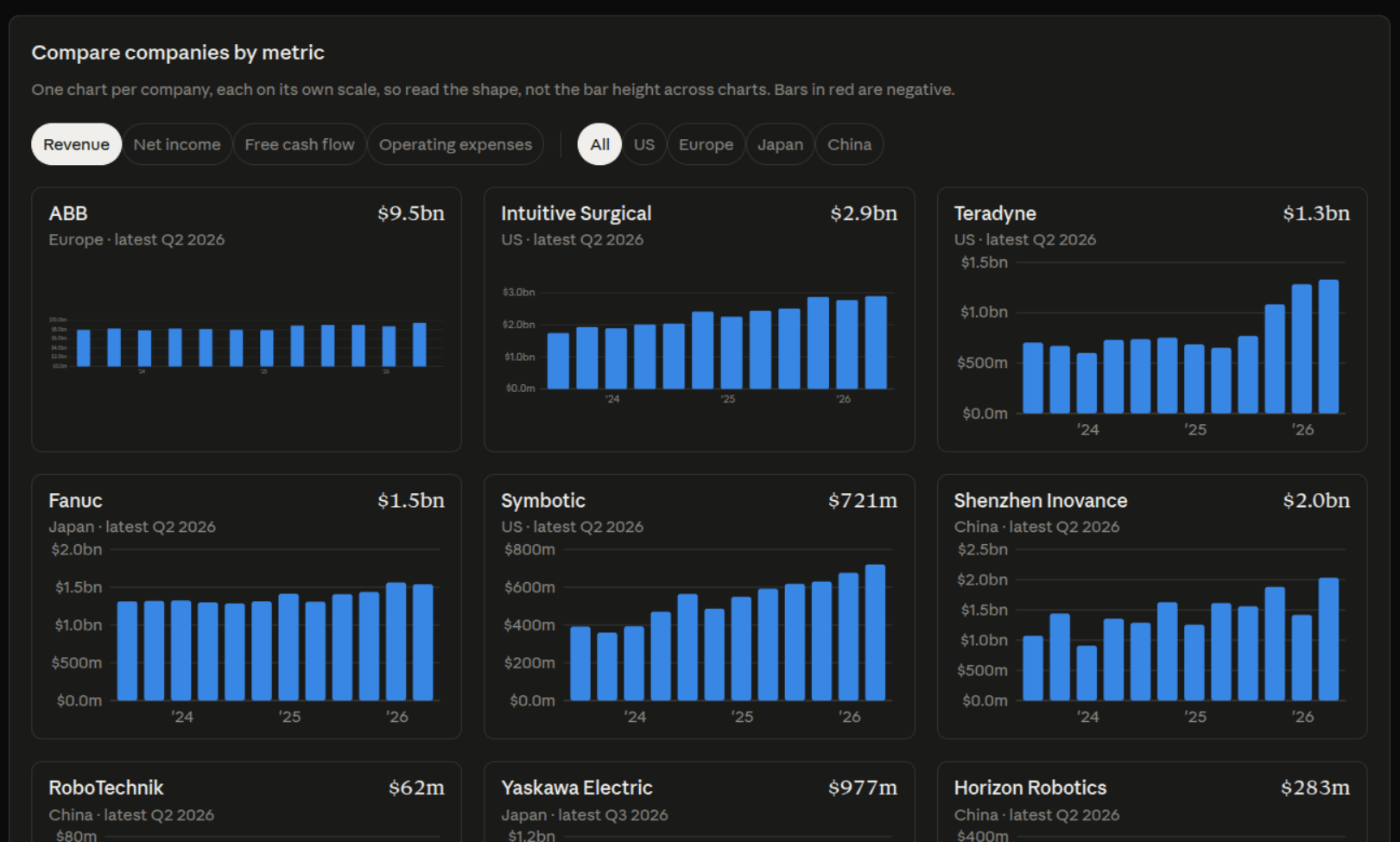
The agent explains how it built the screen, lists the resulting companies by region, and summarizes the main points.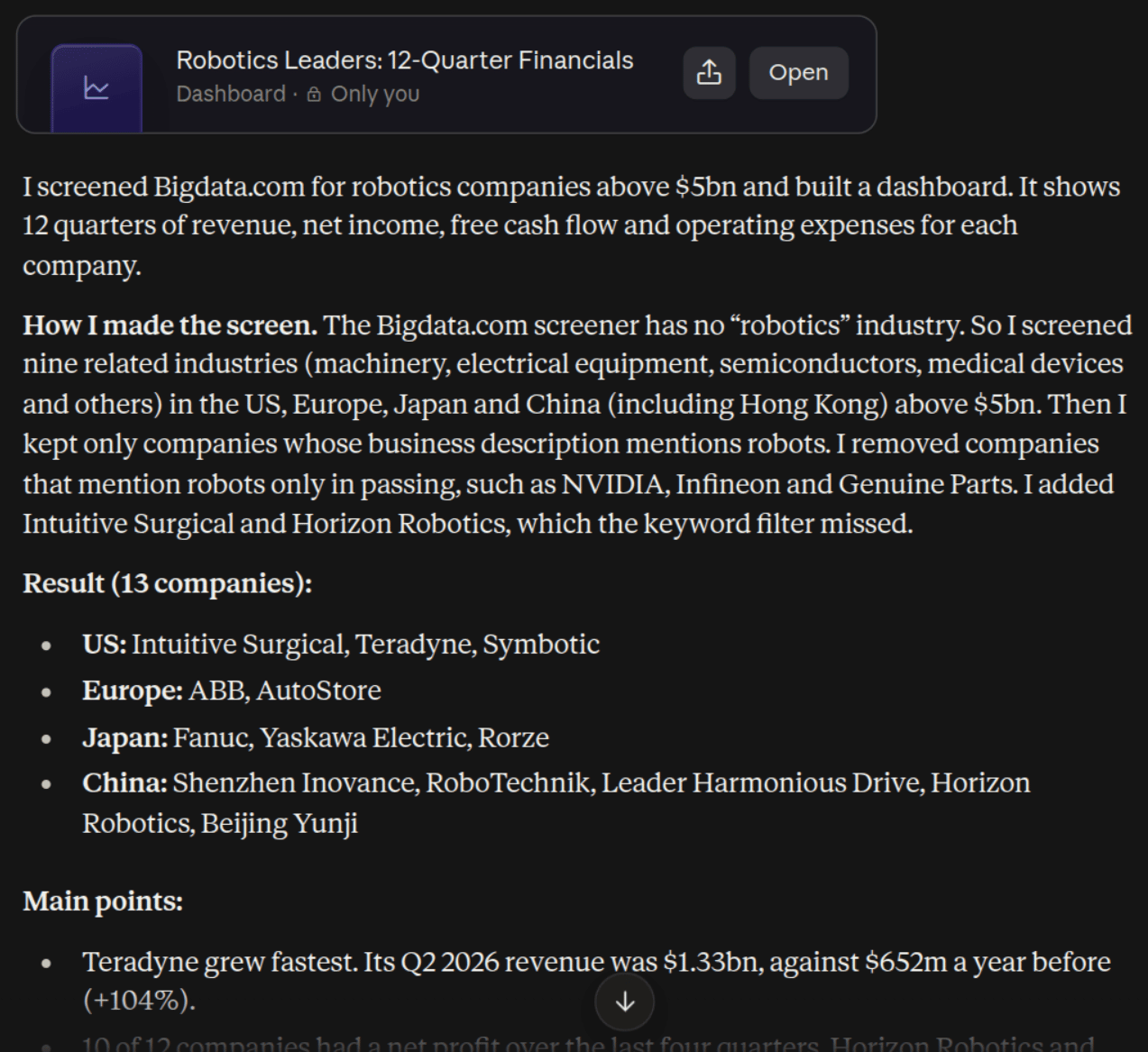
Parameters
Data Returned
Sessions
A session is a live sandbox that keeps the variables, functions, dataframes, and files created by earlier cells. This makes multi-step work efficient: the data is fetched once and reused in later steps.Important Notes
- A session lasts about 30 minutes from the moment it opens. Running cells does not extend it
- When a session expires or is closed, everything in it is destroyed and the
session_idstops working - Each open session counts against a limit of open sessions per user, so close sessions when the work is done
- Sessions are isolated: nothing written in one session is visible to other users or conversations
Practical Tips
Print as you go
Only printed output comes back, and the session is destroyed when it ends. Print intermediate results in each cell instead of leaving them in variables to read later.Split long work into batches
The agent platform may stop waiting for a response before a long cell finishes. For large pulls, such as years of prices for hundreds of companies, fetch the data in batches across several cells in the same session, keeping each batch in a variable.Scope of use
bigdata_computer is designed for the analysis the user asks for, on the data the client exposes. It is not a general-purpose computer and does not allow bulk data extraction or access to anything beyond the Bigdata.com public APIs.