

November 13, 2026
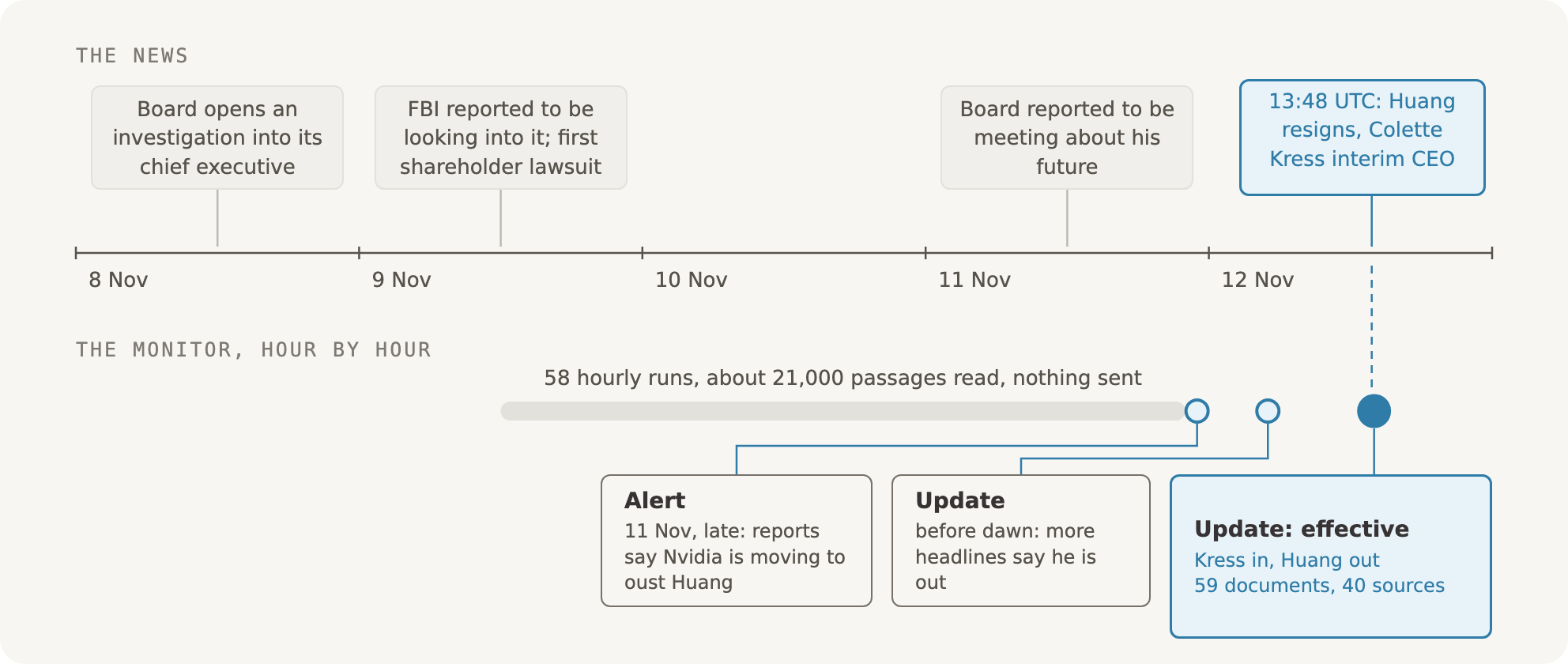
Quiet through days of coverage, an alert when reports said Nvidia was moving to oust Huang, an update as more headlines followed, and the update that mattered at 13:48 UTC on 12 November.
POST /v1/search-monitoring/monitors/{monitor_id}/simulate, with a start and an end time).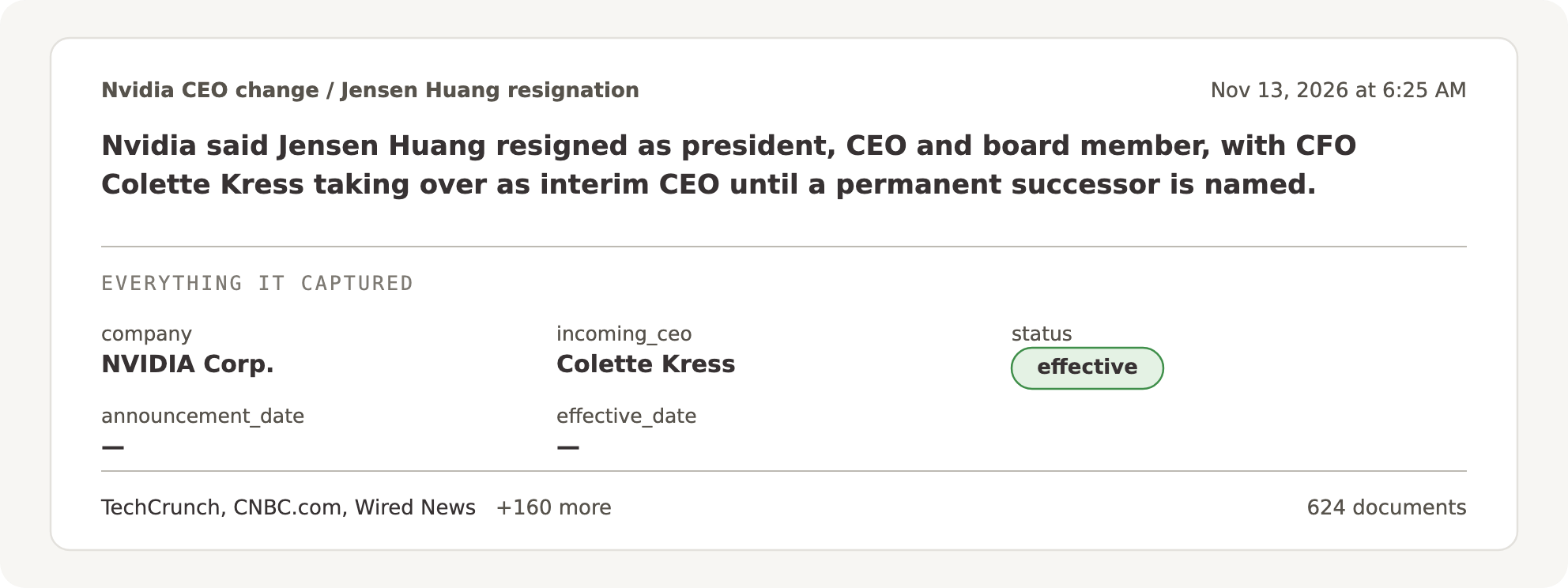
The alert as it arrived on 13 November, from a monitor following the same change: one event from 624 documents and 163 sources, with Colette Kress resolved to her entry in RavenPack's knowledge graph.
Four words, one meaning each
- Document: one news article, regulatory filing or call transcript, stamped with the moment it was published.
- Report: what one document says about one thing that happened, written into the monitor’s form. One document can hold several reports.
- Event: the thing that happened, built from all its reports. AutoZone’s CFO resigning is one event, however many documents tell it. A central bank’s decision at its next meeting is a new event, even when the decision repeats.
- Alert: what you receive. A new event alerts, and so does a known event that moved: a new status, a new person, a figure that changed. An event with nothing new stays quiet: the monitor keeps it, but doesn’t send it.
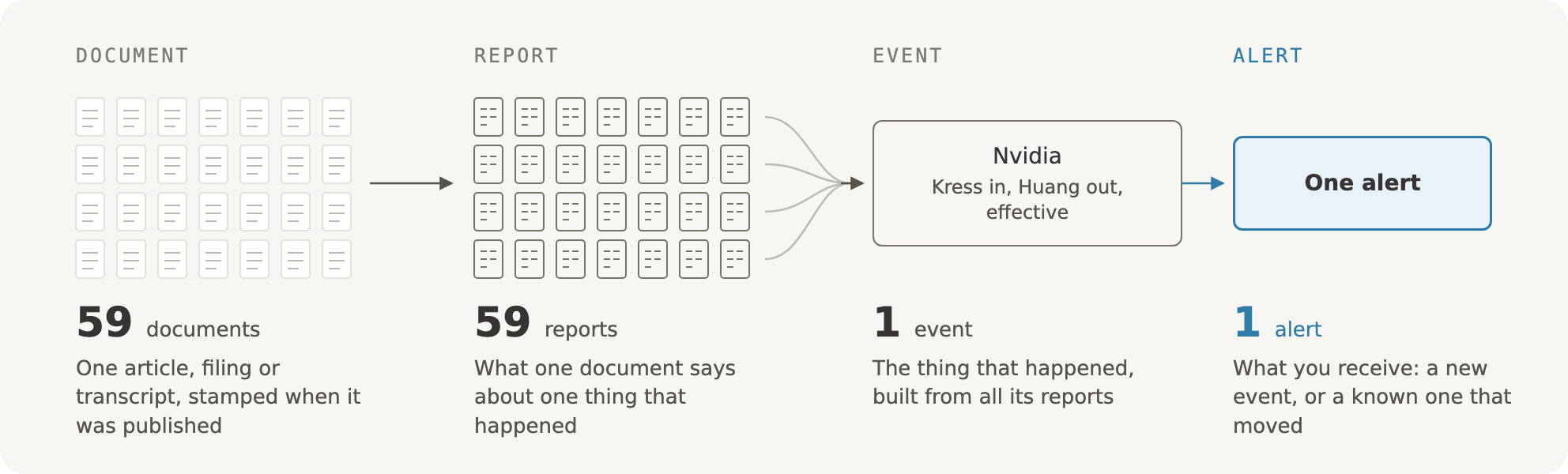
Four words, one meaning each. In the Nvidia story, 59 documents carried 59 reports, which moved one event and sent one alert.
Three questions in every run
For every document it reads, a monitor has to answer three questions, and get all three right.- Is this the event I was asked about? The new head of a company’s health unit is not the company’s CEO.
- Who is it about? “Apple” in a story about orchards is not the company. Fidelity National Information Services and FIS are the same company.
- Have I already told you? The fortieth report of one appointment is not news. The report that says a deal has closed is.
What a monitor is made of
You describe a monitor in one sentence, in the Bigdata.com app or in the AI assistant you already use. A language model drafts its design, which is checked before it’s saved.- An event definition. What counts and what doesn’t, in a few lines. It becomes the reader’s whole brief, so the reader never has to guess what you meant. For “Tell me if Nvidia replaces its CEO”, it covers the chief executive leaving or being replaced, from the announcement to the new chief executive taking over, and says that a confirmation that the current one stays is not the change.
- Fields. What the reader fills in for every report, such as the company, the role, who leaves, who comes, the status and the date it takes effect.
- Search texts, and optionally a watchlist: up to 500 companies, people or places.
- A schedule: every few hours, or at exact times in your time zone.
The architecture
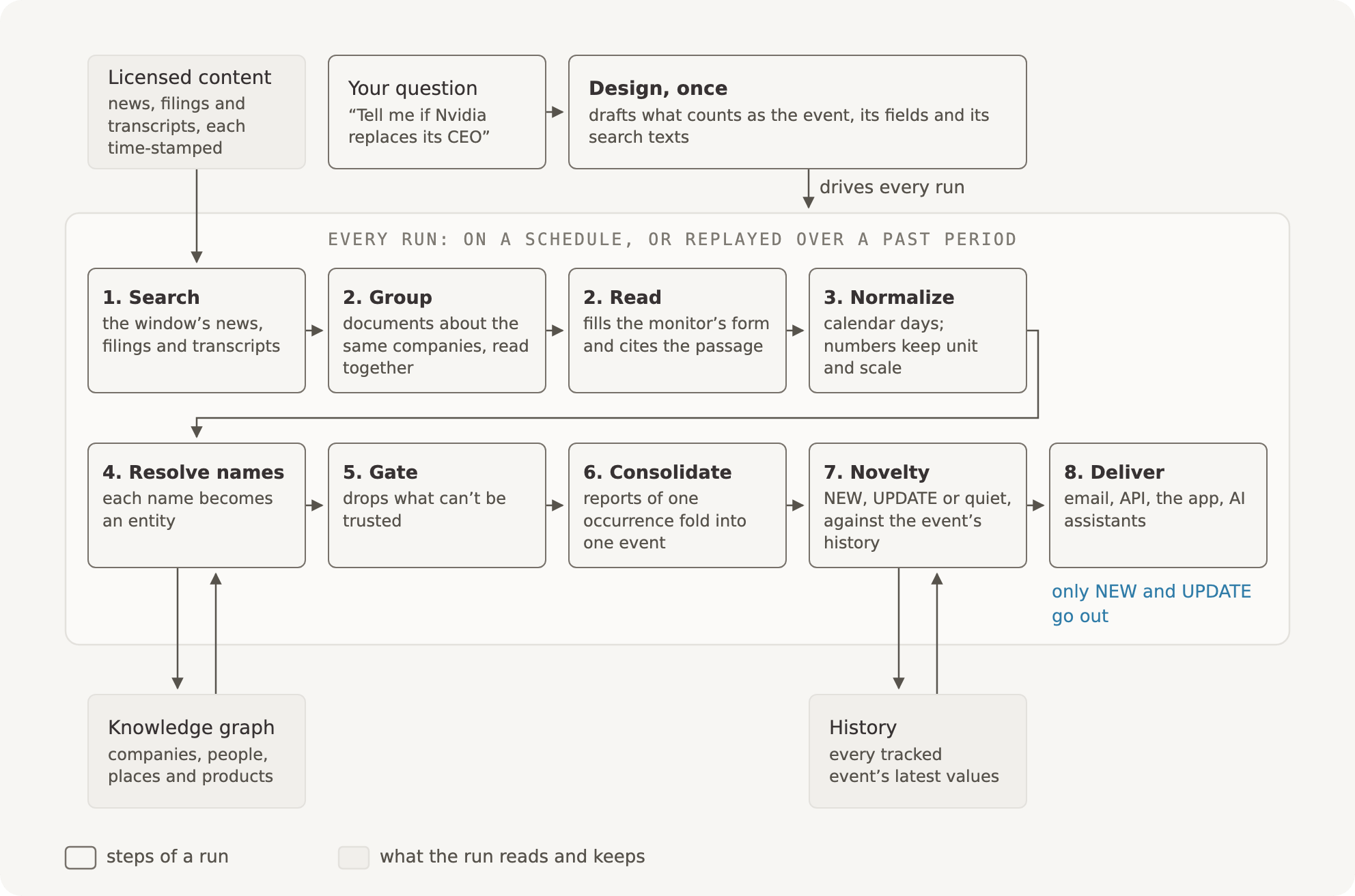
One monitor, from your question to an alert.
1. Search: a window in time
Every run covers a window, from the last run to now. The monitor’s search texts run against licensed news, filings and transcripts, each stamped with the moment it was published. The oldest documents go back to 2000, and how far back each kind goes varies. A watchlist filters at search time, so a monitor on 500 companies reads about those 500 companies, not the whole market. Point in time matters twice. Every document carries two times: when it was published, and when it reached our index, seconds to an hour later. Live, each run reads what reached the index since the last run, so a story that lands late still counts. A replay works the same way: each window sees only what had reached the index by then, and runs every step a live run does, so you can try a monitor on past news before you turn it on.2. Group and read
Documents about the same companies are read together, so one deal’s coverage reaches the reader at once and unrelated stories don’t crowd it. On busy days in our tests, reading documents grouped by the pair of companies they are about found about twice as many distinct events as reading them in fixed-size bundles. A language model reads each document and fills in the monitor’s form once for every thing that happened in it. Each field takes one kind of answer: a date, a number with its unit, a name, or a stage from a fixed list. A field the document doesn’t state stays empty; it is never guessed. Every report cites the passages it came from, and a report with no source is dropped before it can alert. When a document is unclear, the reader is told to leave it out: we would rather miss a report than send a false alert.3. Normalize dates and numbers
Dates like “last Tuesday”, “with immediate effect” and “in the fourth quarter” can’t be compared as written. So every date becomes a calendar day or a period, read in the document’s own time: a year-less “September 30” in a document from October means this year, not next. The reader also marks each date as past or future from the sentence’s own words, so “left in January”, read in October, is last January, and “starts in January” is next. In a test of 33 relative and weekday dates, all 33 landed on the right day. An event with no date of its own takes the document’s date only when the headline states it. A profile published in November may open with a retirement in 2014, and being near the top of the document doesn’t make it today’s news. Every number keeps the value, unit and scale the source stated, so “$22 billion" and "$22bn” are the same value, and a headcount isn’t compared with a percentage.4. Resolve names to entities
An event is only as good as its who. Monitors resolve the names in a report’s fields to entities in RavenPack’s knowledge graph of companies, people, places and products, the same graph that tags every document in our index. A name is matched in several ways: the entity tags already on the document, a lookup of the name in its context, and the monitor’s own watchlist. When a name could be several entities, or none, a decision step weighs the candidates of the kind the field allows and picks one, or says it is none of them. On ten test monitors, that step cut the cases of two different names wrongly treated as one from 108 to 3. A name nobody knows yet, such as a new start-up, a product or a hacker group, gets an entry of its own that stays the same from run to run, so it can still be followed and still alerts once. We collect those names, and the names the graph files in the wrong place, as requests for the team that maintains it: add this company, merge these two entries, give this person a description. Once a fix is in the graph, every product that reads it knows.5. Gate: junk never alerts
Before anything is compared, the monitor drops what can’t be trusted: a report with no usable date, a report that doesn’t say who it is about, a report older than the monitor’s age limit or, for a watchlist, a report that doesn’t name a watched entity in a field that matters. We accept the trade. Once in a while a real event is lost, and junk never reaches you.6. Consolidate: many reports, one event
Documents are read in parallel batches. Grouping them by the companies they’re about (step 2) means most of an event’s coverage is read together, but a big story can fill several batches, so one event can still come out as several reports. Before anything is judged, they are folded into one event: grouped by what they are about, ordered by publication time and merged while they describe the same event. A stated value beats an empty one. A later value replaces an earlier one only when the field’s own comparison calls it a change. Every distinct value and every source is kept, in the order they were published. When Keysight named its next CFO on 2 November, the news arrived in eight stories and the company’s 8-K filing within about an hour of the market close. One headline gave the start date and the CFO he succeeds; the others gave less. The monitor sent one alert that carried every detail, with all nine documents under it.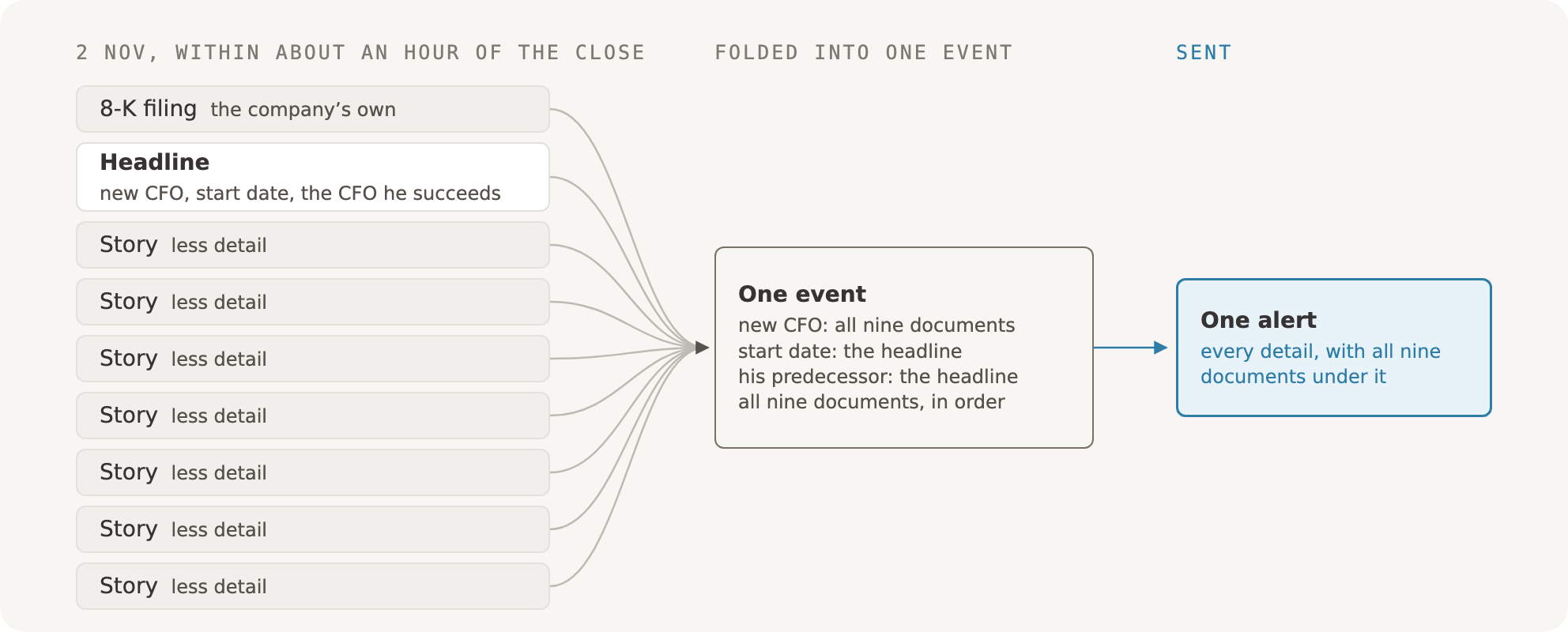
Nine documents within about an hour, each with part of the story. They fold into one event that carries every detail, and one alert goes out.
7. Novelty: new, update or quiet
Now the monitor compares each event with its history. Every event the monitor has seen is tracked with its latest values and when it was last seen. The same company can have many events over time: one per meeting, one per quarter’s guidance, one per appointment.- A new event is NEW, and it alerts.
- A known event that moved is an UPDATE, and it alerts: a new status, a different person, a number that moved by more than its tolerance.
- A known event with nothing new stays quiet.
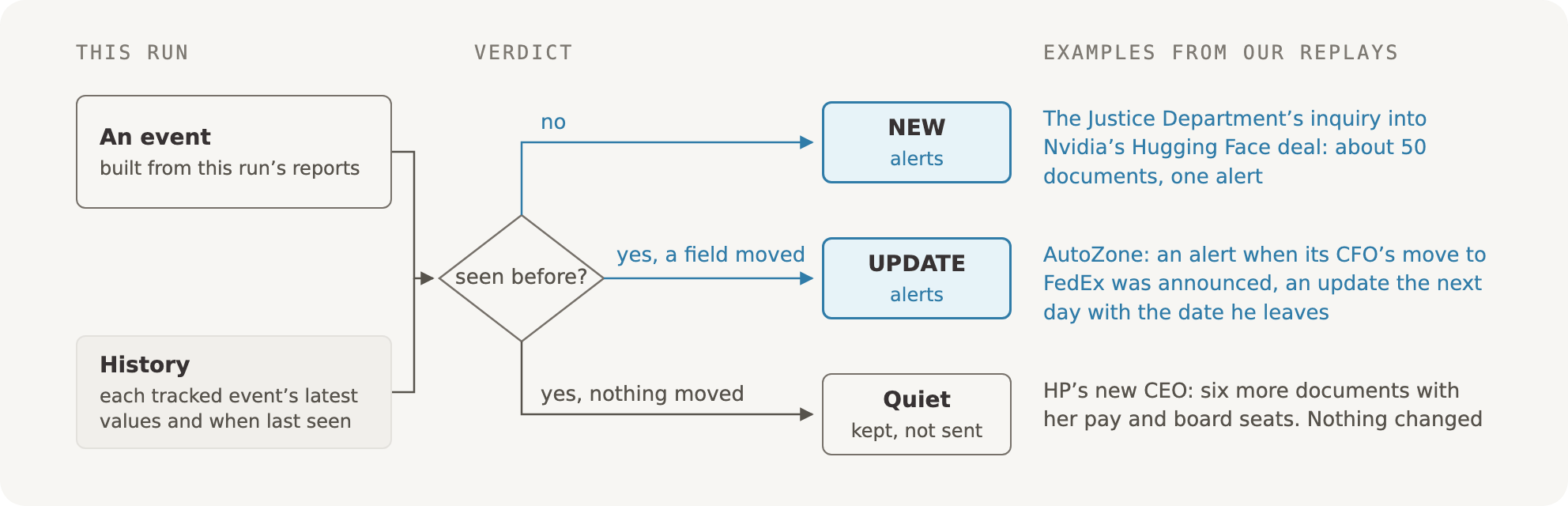
Every event is compared with what the monitor already knows. Only NEW and UPDATE go out; the rest is kept, and stays quiet.
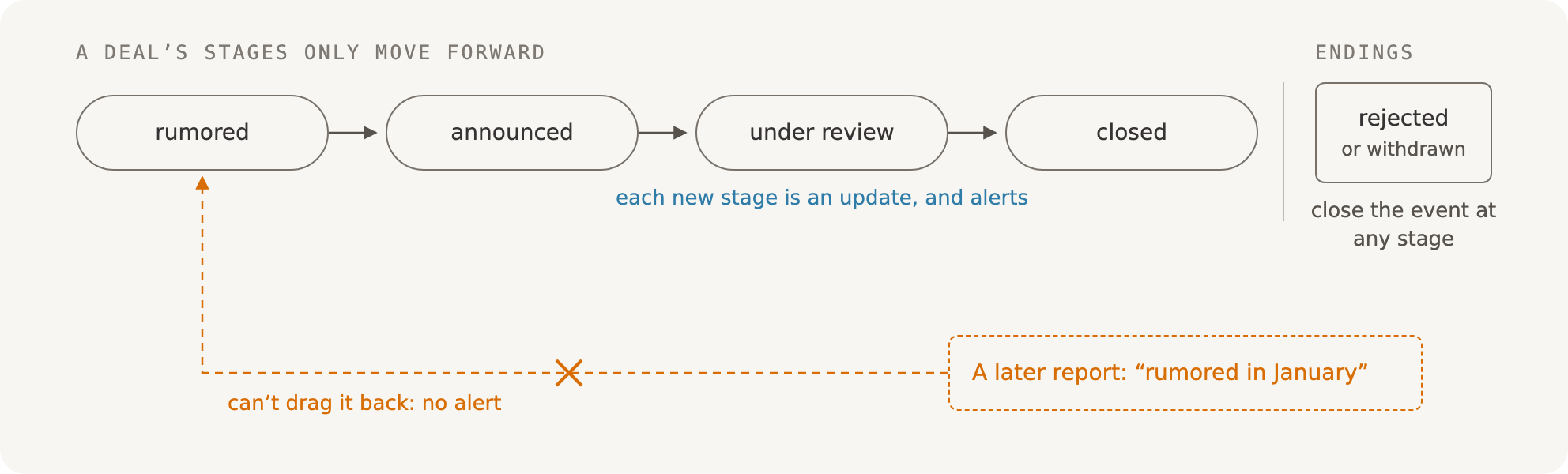
Stages only move forward. Each new stage alerts as an update; a later recap of an old rumor can't move the deal back.
8. Deliver
Alerts go out by email, through the API, in the Bigdata.com app and to the AI assistants that connect to Bigdata.com. Every alert carries its fields and links to its sources. In a replay, the quiet events are there too, marked as already known, so you can see what the monitor held back.The choices, in one table
Try it before you trust it
- Preview. Describe a monitor and see sample events from one recent window in seconds. Nothing is saved to its history.
- Replay. Run the monitor over a past period through the whole pipeline. A replay first reads the week before its first window in silence, so its first alert is news, not a backlog.
- Activate. The first live run does the same silent read, so you aren’t flooded with last week’s news. A paused monitor, turned back on, reads what it missed the same way, in silence, and alerts on what comes next.
- Schedule. A weekday schedule’s Monday run covers the weekend in one email, not three.

János Juhász
Head of Engineering, Search (VP)